Create a DV With a Group
With the Obol agent skills installed, paste this into Claude Code:
I'm setting up a distributed validator cluster with other operators on Hoodi. Walk me through creating the cluster invitation and running the DKG ceremony together.
Pre-requisites
- A basic knowledge of Ethereum nodes and validators.
- A machine that meets the minimum requirements for the network you intend to validate.
- If you are taking part using a DappNode:
- A computer with an up to date version of DappNode's software and an internet connection.
- If you are taking part using Sedge, or Charon's Distributed Validator Node (CDVN) starter repo:
- If you are taking part using Helm:
Step 1: Get your ENR
- CDVN
- DappNode
- Sedge
- Helm
In order to prepare for a distributed key generation ceremony, you need to create an ENR for your Charon client. This ENR is a public/private key pair that allows the other Charon clients in the DKG to identify and connect to your node. If you are creating a cluster but not taking part as a node operator in it, you can skip this step.
# Clone the repo
git clone https://github.com/ObolNetwork/charon-distributed-validator-node.git
# Change directory
cd charon-distributed-validator-node/
# Use docker to create an ENR. Backup the file `.charon/charon-enr-private-key`.
docker run --rm -v "$(pwd):/opt/charon" obolnetwork/charon:v1.11.0 create enr
You should expect to see a console output like this:
Created ENR private key: .charon/charon-enr-private-key
enr:-JG4QGQpV4qYe32QFUAbY1UyGNtNcrVMip83cvJRhw1brMslPeyELIz3q6dsZ7GblVaCjL_8FKQhF6Syg-O_kIWztimGAYHY5EvPgmlkgnY0gmlwhH8AAAGJc2VjcDI1NmsxoQKzMe_GFPpSqtnYl-mJr8uZAUtmkqccsAx7ojGmFy-FY4N0Y3CCDhqDdWRwgg4u
Please make sure to create a backup of the private key at .charon/charon-enr-private-key Be careful not to commit it to git! If you lose this file you won't be able to take part in the DKG ceremony nor start the DV cluster successfully.
If instead of being shown your enr you see an error saying permission denied then you may need to update your docker permissions to allow the command to run successfully.
For Step 2 of the quickstart:
- Select the Creator tab if you are coordinating the creation of the cluster (this role holds no position of privilege in the cluster, it only sets the initial terms of the cluster that the other operators agree to).
- Select the Operator tab if you are accepting an invitation to operate a node in a cluster, proposed by the cluster creator.
Prepare an Execution and Consensus client
Before preparing the DappNode to take part in a Distributed Validator Cluster, you must ensure you have selected an execution client & consensus client on your DappNode under the 'Stakers' tab for the network you intend to validate.
-
Login to the DappNode Interface:
-
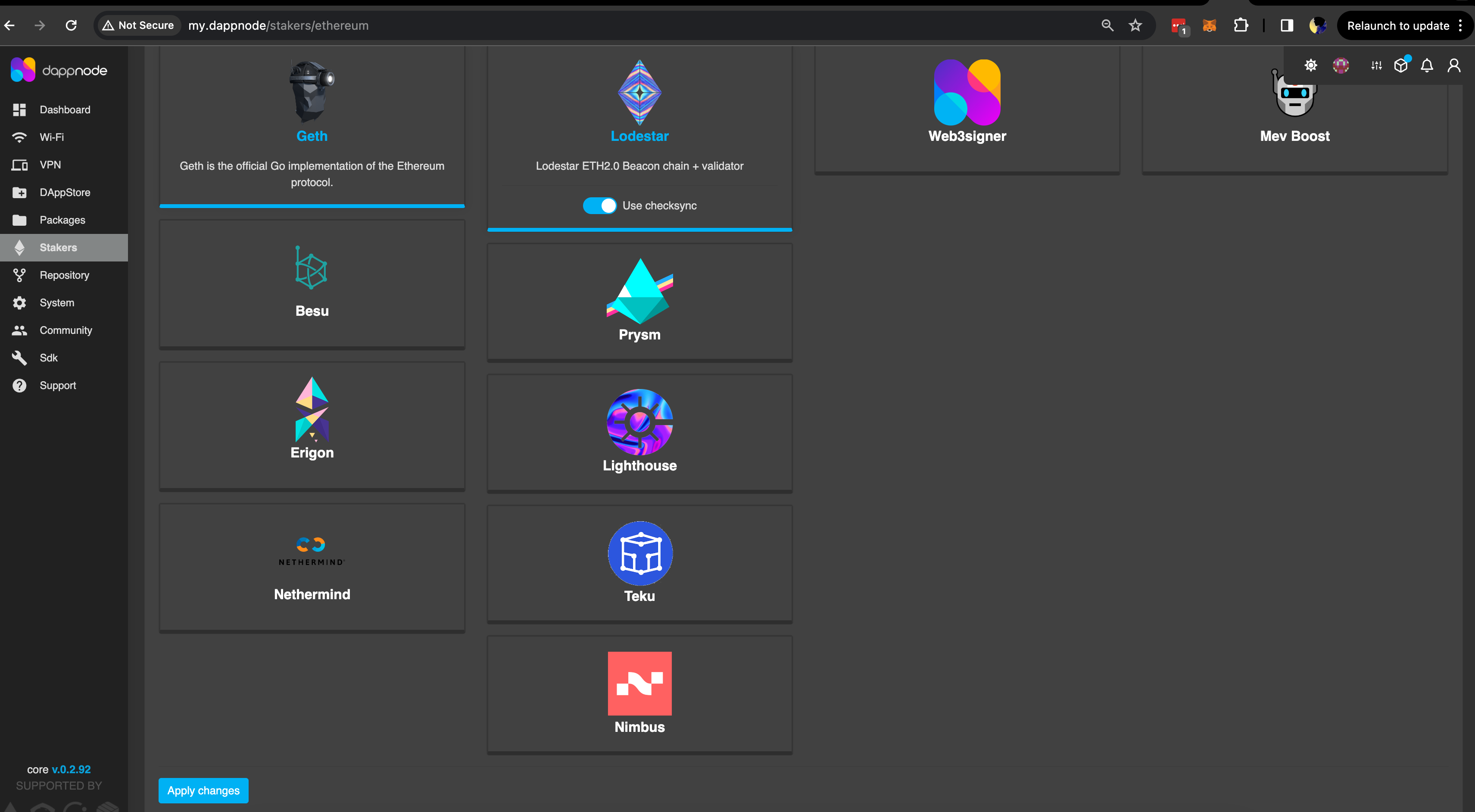
Click on the 'Stakers' tab on the left side, select an execution client (e.g. Geth) & consensus client (e.g. Lodestar) & click 'Apply changes'. This will start the syncing process which can take a number of hours.
-
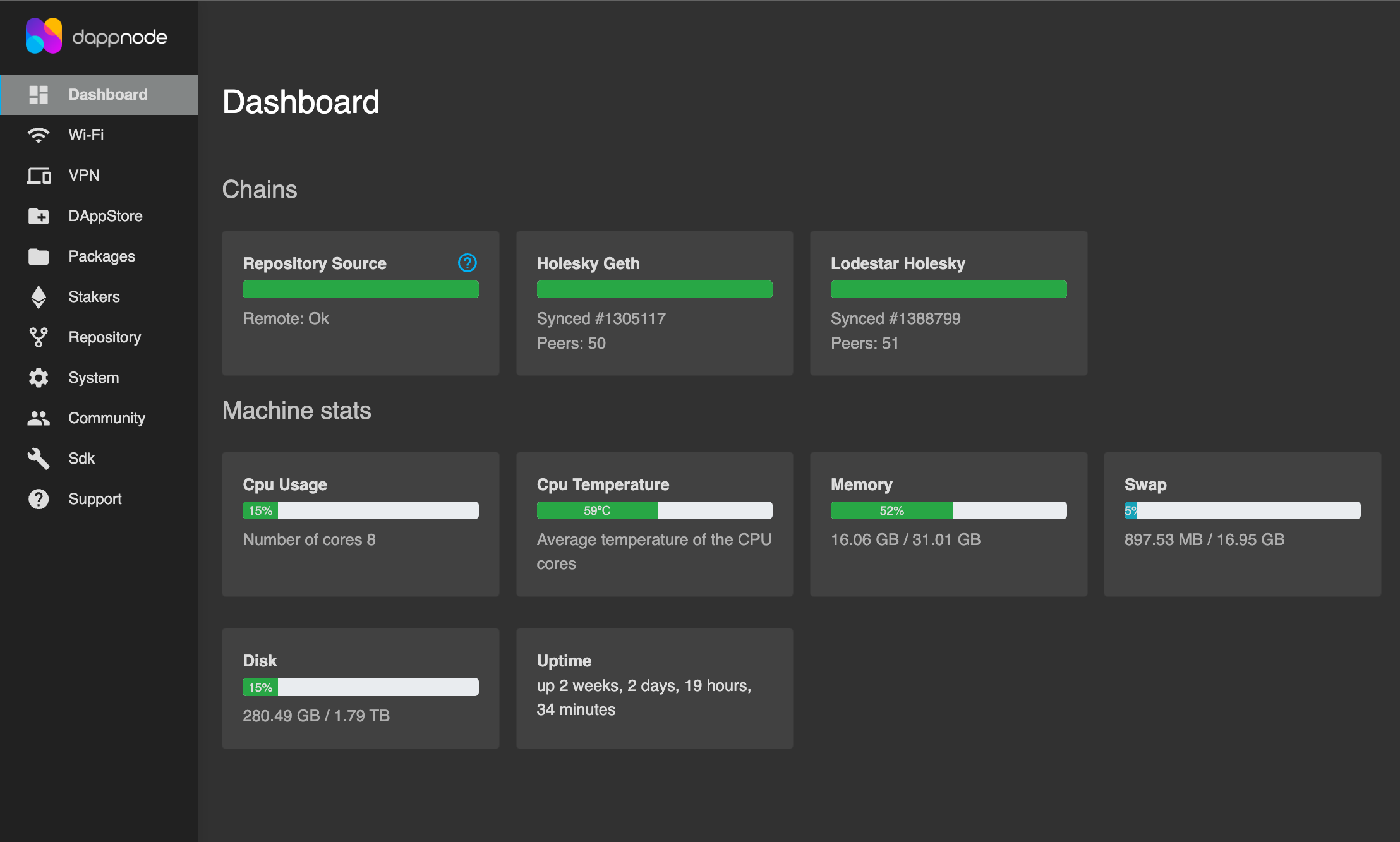
Once the clients are finished syncing, it should reflect on your 'Dashboard' as shown below.
Install the Obol DappNode package
With a fully synced Ethereum node now running on the DappNode, the below steps will walk through installing the Obol package via an IPFS hash and preparing for a Distributed Key Generation ceremony. Future versions of this guide will download the package from the official DappNode DappStore once a stable 1.0 release is made.
-
Before installing the package, make sure you are installing the correct one for Mainnet. You can find the link to the package below:
-
Copy the latest IPFS hash from the release details dropdown.
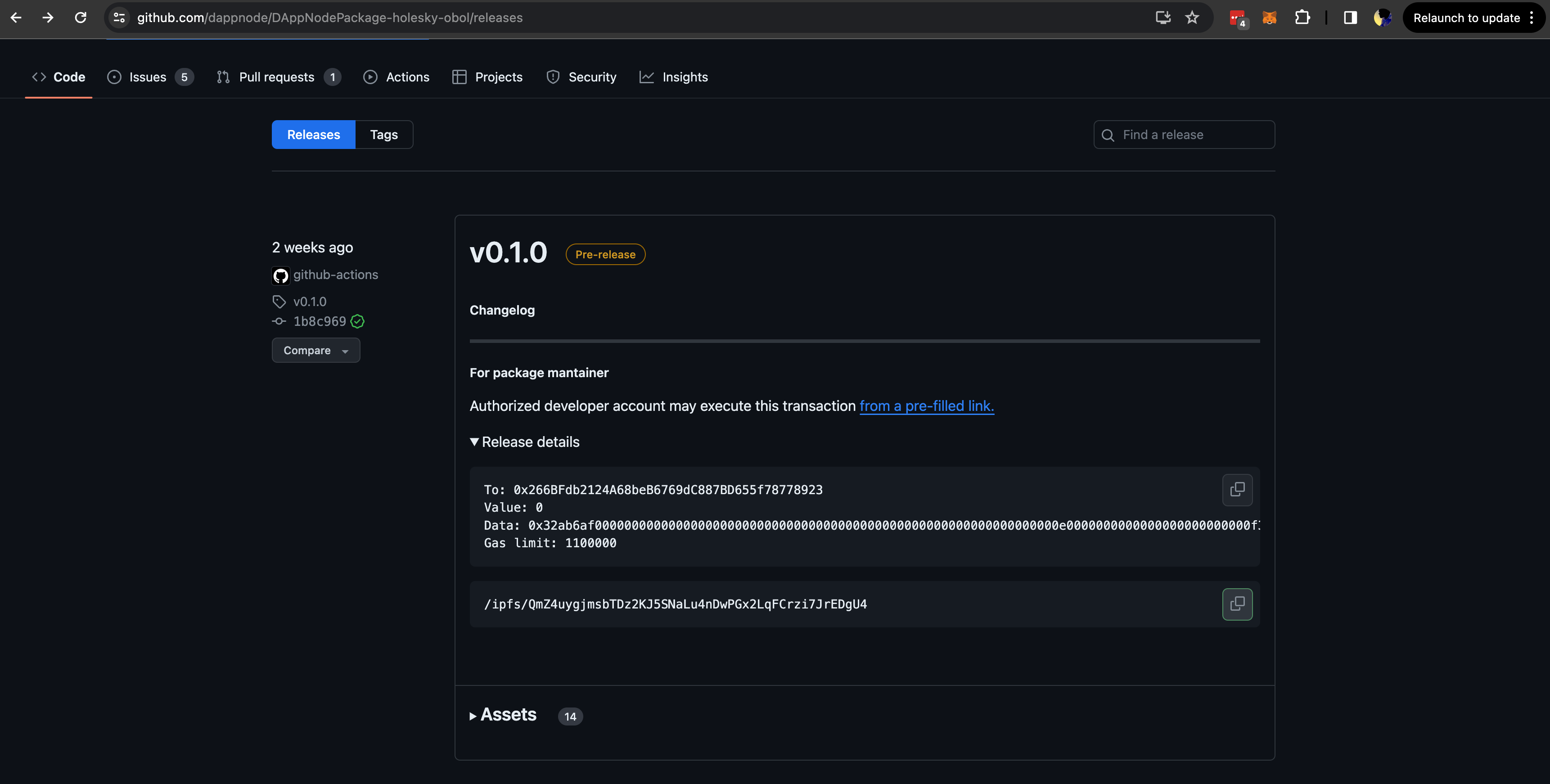
-
Go back to DappNode Dashboard > Dappstore, select the 'Public' tab, and accept the terms & conditions before proceeding.
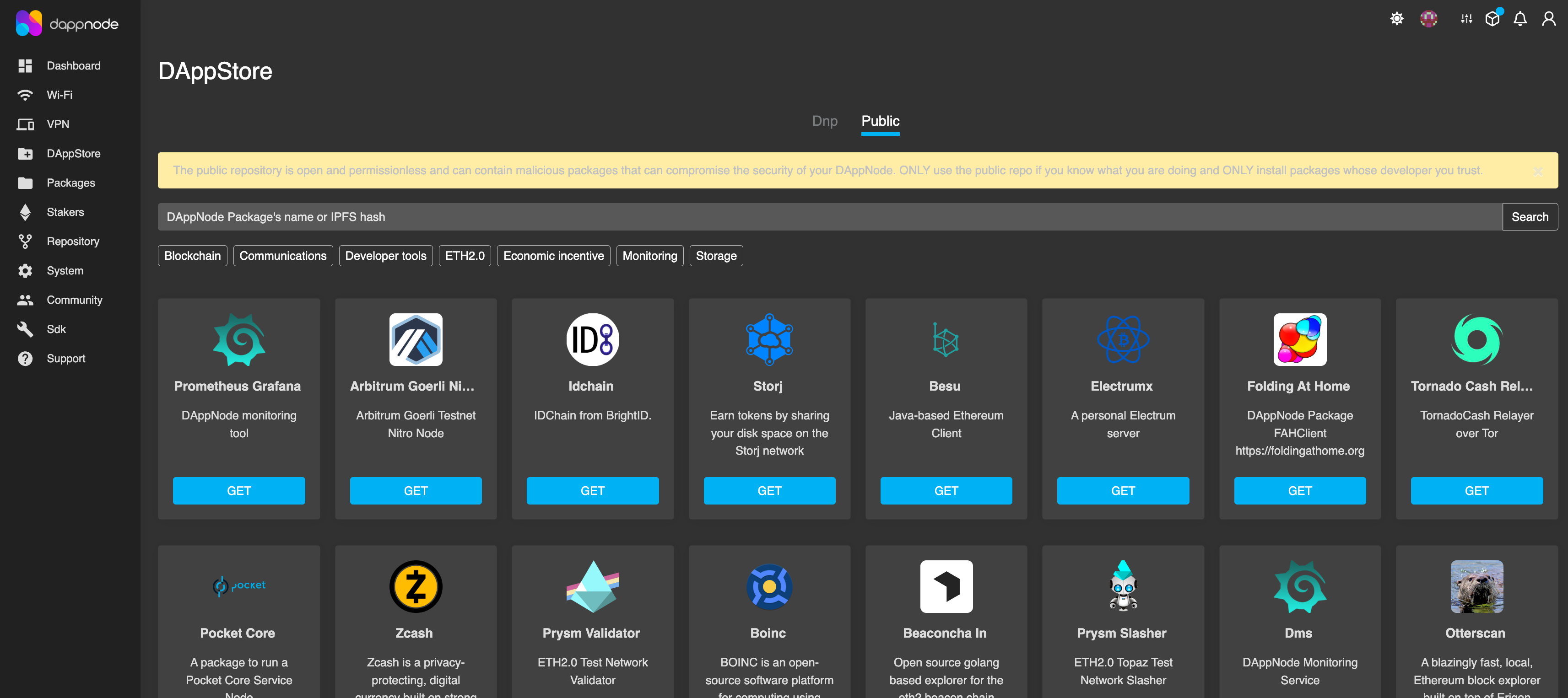
-
Paste the IPFS hash you copied from Github and click 'Search' (It may take a minute for the package to be found.) You will then be presented with the package installation page. Under the blue 'Install' button, click on 'Advanced Options' & toggle the button to 'Bypass only signed safe restriction'.
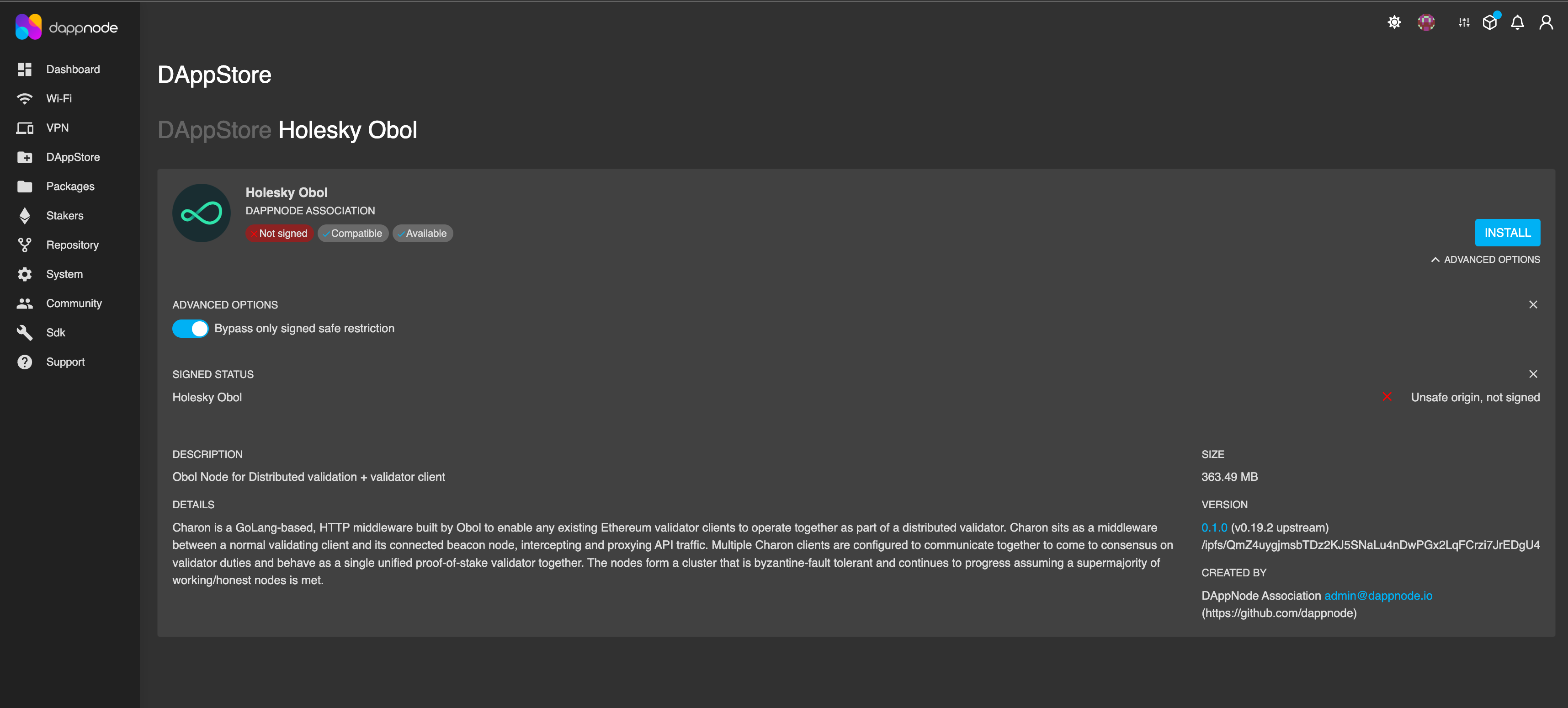
-
Click 'Install' & in the config mode page > select new cluster & submit. (if you already have the config URL, you can select URL option.)
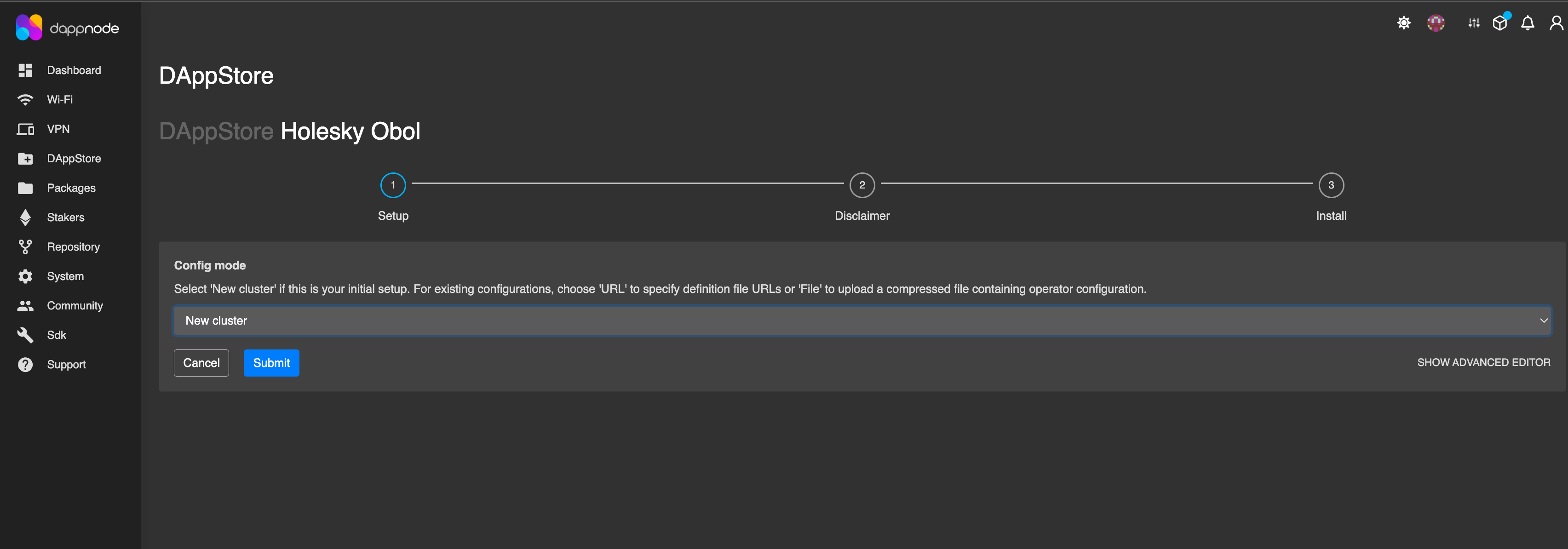
-
Accept the terms & conditions and the install process will begin.
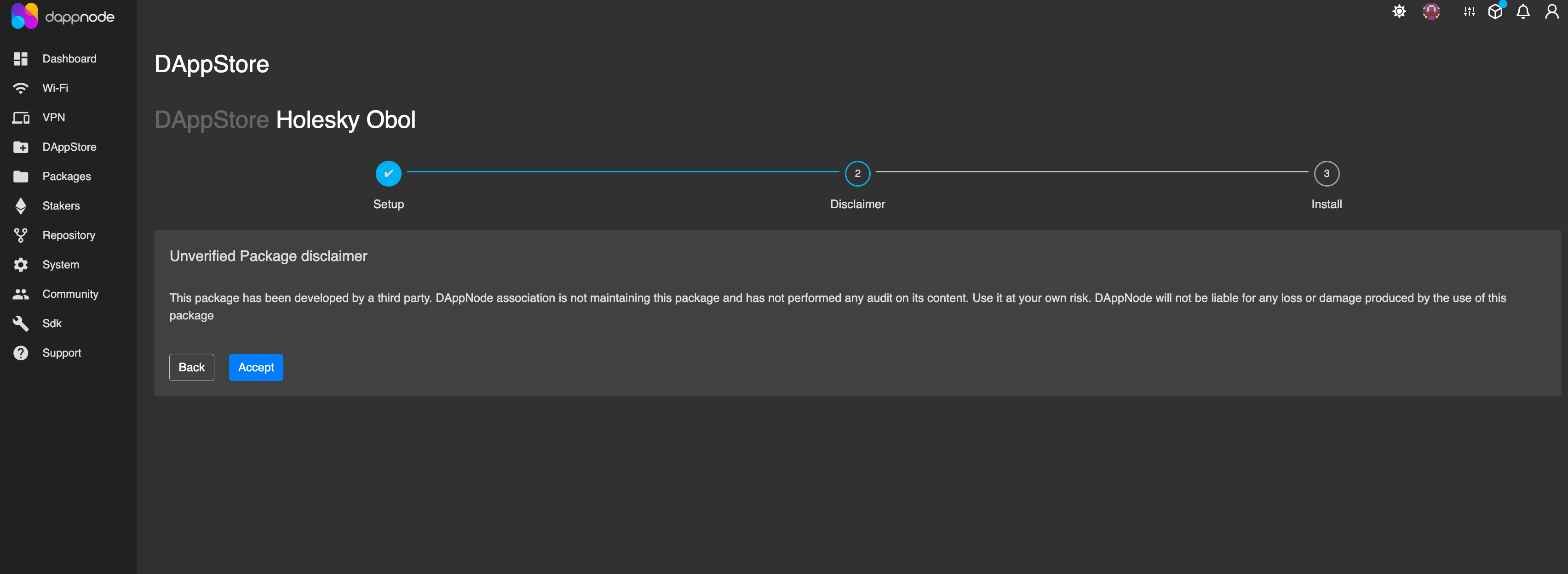
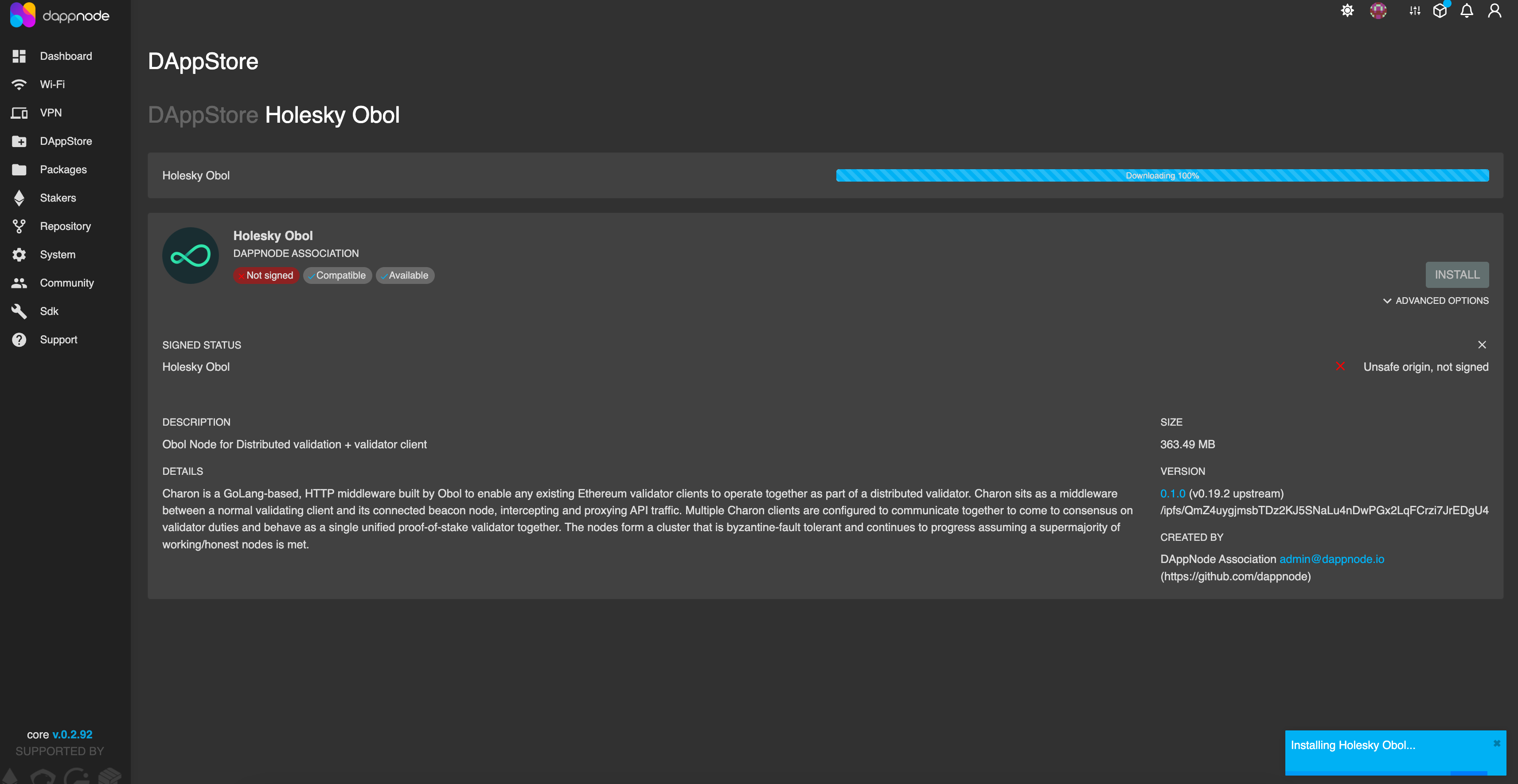
-
You should now be able to see the Obol package under the 'Packages' tab. Click on the package to see important details.
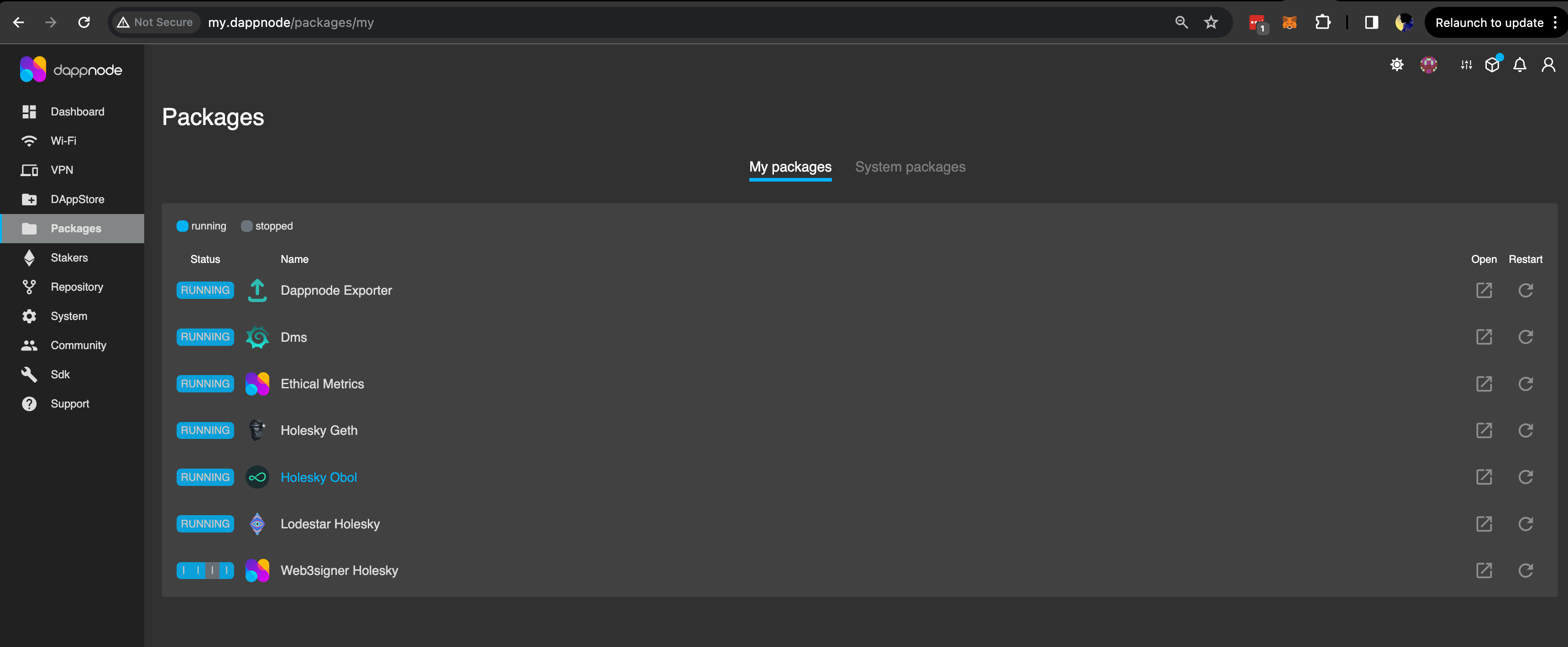
-
Under the 'Info' tab, you will see pre-generated ENRs, along with information such as the status of all five distributed validator clusters, their docker volumes & other menu options.
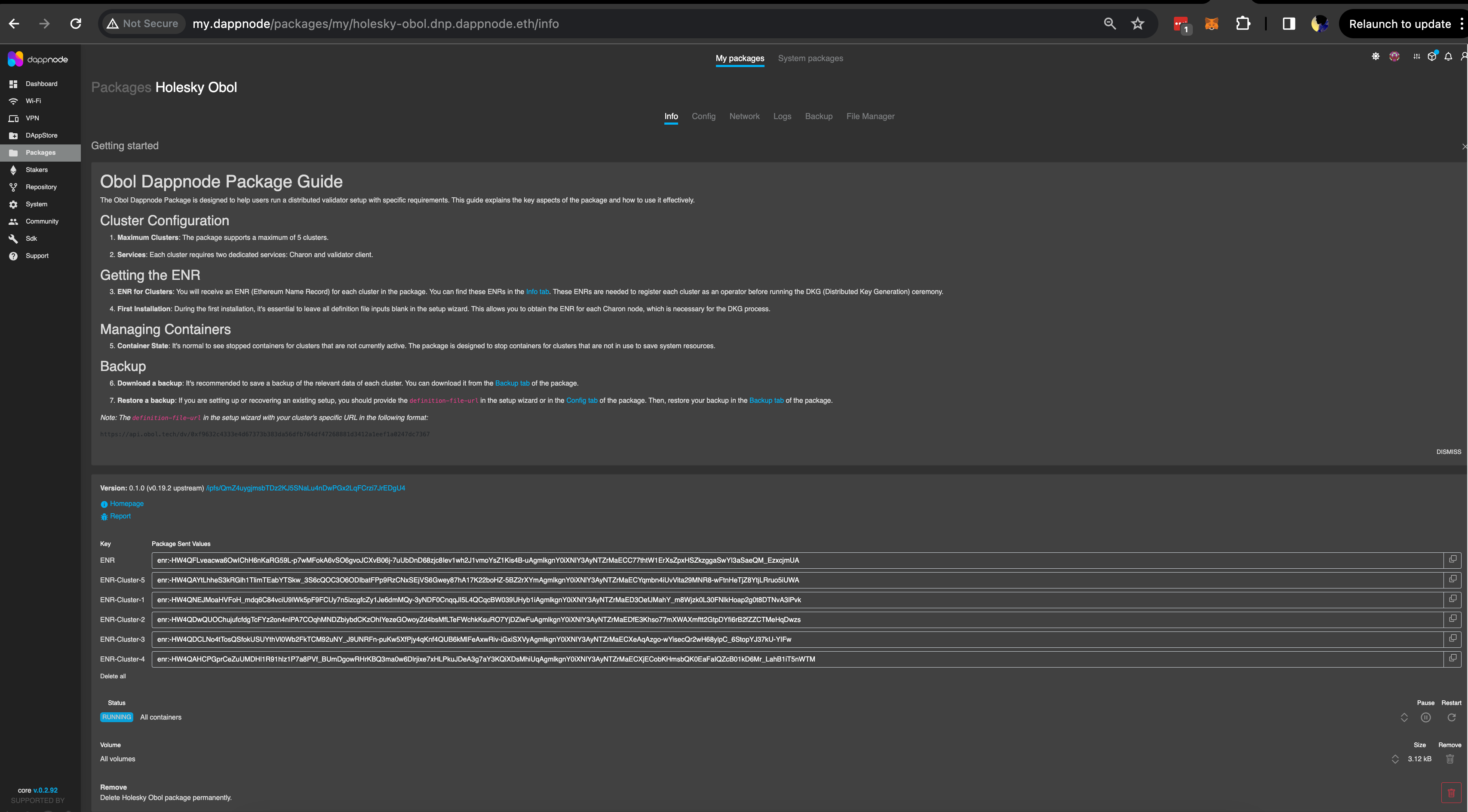
-
Select any of the ENRs listed that are not already in use. This ENR will be used in the next step.
For Step 2 of the quickstart:
- Select the Creator tab if you are coordinating the creation of the cluster (this role holds no position of privilege in the cluster, it only sets the initial terms of the cluster that the other operators agree to).
- Select the Operator tab if you are accepting an invitation to operate a node in a cluster, proposed by the cluster creator.
Installing Sedge
First you must install Sedge, please refer to the official Sedge installation guide to do so.
Check the install was successful
Run the below command to check if your have successfully installed sedge in your computer.
sedge
Expected output:
A tool to allow deploying validators with ease.
  Usage:
    sedge [command]
  Available Commands:
    cli             Generate a node setup interactively
    clients         List supported clients
    deps            Manage dependencies
    down            Shutdown sedge running containers
    generate        Generate new setups according to selected options
    help            Help about any command
    import-key      Import validator keys
    keys            Generate keystore folder
    logs            Get running container logs
    networks        List supported networks
    run             Run services
    show            Show useful information about sedge running containers
    slashing-export Export slashing protection data
    slashing-import Import slashing protection data
    version         Print sedge version
  Flags:
    -h, --help               help for sedge
        --log-level string   Set Log Level, e.g panic, fatal, error, warn, warning, info, debug, trace (default "info")
  Use "sedge [command] --help" for more information about a command.
Create an ENR using charon:
# Use docker to create an ENR. Backup the file `.charon/charon-enr-private-key`.
docker run --rm -v "$(pwd):/opt/charon" obolnetwork/charon:v1.11.0 create enr
For Step 2 of the quickstart:
- Select the Creator tab if you are coordinating the creation of the cluster (this role holds no position of privilege in the cluster, it only sets the initial terms of the cluster that the other operators agree to).
- Select the Operator tab if you are accepting an invitation to operate a node in a cluster, proposed by the cluster creator.
The dv-pod Helm chart generates an ENR for your node, waits until your cluster is ready on the Launchpad, and then runs the DKG for you. These steps are for chart version 0.22.0 or later. Running your node in the Obol Stack? Follow that page instead.
1. Add the Obol Helm repository and choose a chart version:
helm repo add obol https://obolnetwork.github.io/helm-charts
helm repo update
helm search repo obol/dv-pod --versions | head
Pass the version you choose with --version on every helm install and helm upgrade, so you never pick up a new chart by accident. The commands below use 0.22.0.
2. Install the chart with your network and operator address:
helm upgrade --install my-dv-pod obol/dv-pod --version 0.22.0 \
  --namespace dv-pod --create-namespace \
  --set mode=launchpad \
  --set network=hoodi \
  --set charon.operatorAddress=<YOUR_OPERATOR_ADDRESS> \
  --set 'charon.beaconNodeEndpoints[0]=<BEACON_NODE_ENDPOINT>'
network(mainnet,hoodiorsepolia; the chart defaults tomainnet) must be right at install time. The DKG sidecar only looks for cluster invites on this network.charon.operatorAddressis the Ethereum address you connect to the Launchpad with.charon.beaconNodeEndpointsmust point at a synced beacon node on the same network.
The chart generates an ENR private key and stores it in the Secret my-dv-pod-enr-key, in the release namespace. It writes the public ENR to the ConfigMap my-dv-pod-enr. The pod then waits in its dkg-sidecar init container until a cluster that contains this ENR is ready. After the install, Helm prints the exact names and the next commands. Run helm get notes my-dv-pod -n dv-pod to see them again.
3. Get this pod's ENR:
kubectl get configmap my-dv-pod-enr -n dv-pod -o jsonpath='{.data.enr}'
You'll paste this ENR on the Launchpad in Step 2. Use the ENR of this pod, not one you generated somewhere else: the sidecar only accepts a cluster definition that contains this pod's ENR.
The ENR private key is your node's identity in the cluster, and it can't change once the cluster exists. Back up the ENR Secret (kubectl get secret my-dv-pod-enr-key -n dv-pod -o yaml) and store it somewhere safe. The chart never overwrites an existing key, and the Secret stays in place after helm uninstall. The chart only looks for the Secret in the release namespace.
If you already have an ENR private key (for example, from charon create enr), create a Secret from it in the release namespace and point the chart at it:
kubectl create secret generic my-dv-pod-enr-key -n dv-pod \
  --from-file=charon-enr-private-key=.charon/charon-enr-private-key
Then add --set charon.enr.existingSecret.name=my-dv-pod-enr-key to the install command. The chart works out the public ENR from the key and writes it to the my-dv-pod-enr ConfigMap.
For Step 2 of the quickstart:
- Select the Creator tab if you are coordinating the creation of the cluster (this role holds no position of privilege in the cluster, it only sets the initial terms of the cluster that the other operators agree to).
- Select the Operator tab if you are accepting an invitation to operate a node in a cluster, proposed by the cluster creator.
Step 2: Create a cluster or accept an invitation to a cluster
- Creator
- Operator
Collect addresses, configure the cluster, share the invitation
Before starting the cluster creation process, you will need to collect an Ethereum address for each operator in the cluster. They will need to be able to sign messages with this address from a wallet supported by the Launchpad: an injected browser wallet (such as MetaMask) or any wallet that connects via WalletConnect. With these addresses in hand, go through the cluster creation flow.
- Launchpad
- CDVN
You will use the Launchpad to create an invitation, and share it with the operators. This video shows the flow within the DV Launchpad
The following are the steps for creating a cluster.
-
Go to the DV Launchpad
-
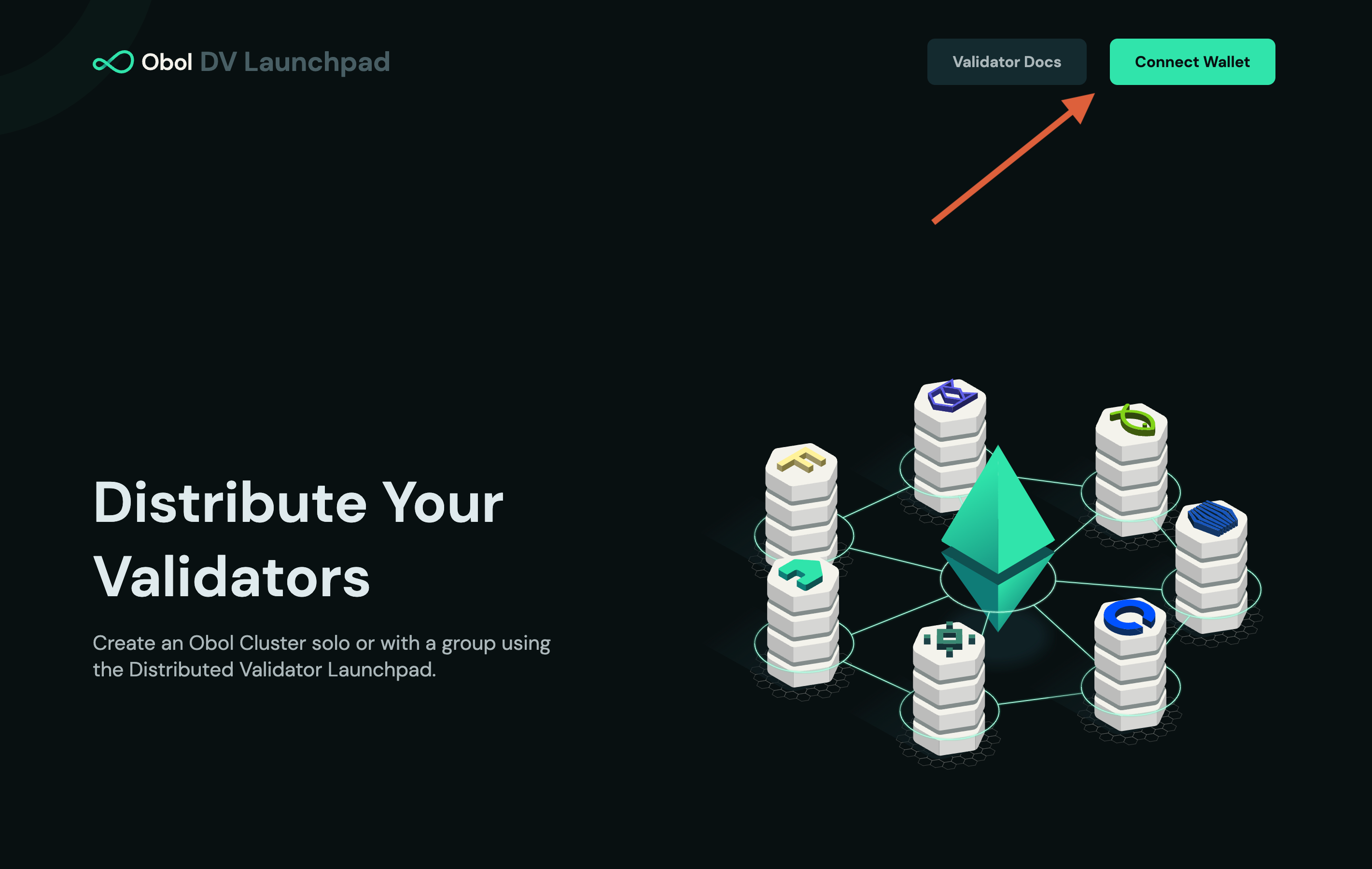
Connect your wallet
-
Click + New in the navigation bar and choose Group, then click
Get Started. -
Follow the flow and accept the advisories.
-
Configure the Cluster
- Input the
Cluster Name&Cluster Size(i.e. number of operators in the cluster). The threshold will update automatically, it shows the number of nodes that need to be functioning for the validator(s) to stay active.
- Input the
-
Input the Ethereum addresses for each operator that you collected previously. If you will be taking part as an operator, click the "Use My Address" button for Operator 1.
- Select the desired amount of validators (32 ETH each) the cluster will run.
- If you are taking part in the cluster, enter the ENR you generated in step one in the "What is your charon client's ENR?" field.
- Choose the suitable withdrawal configuration:
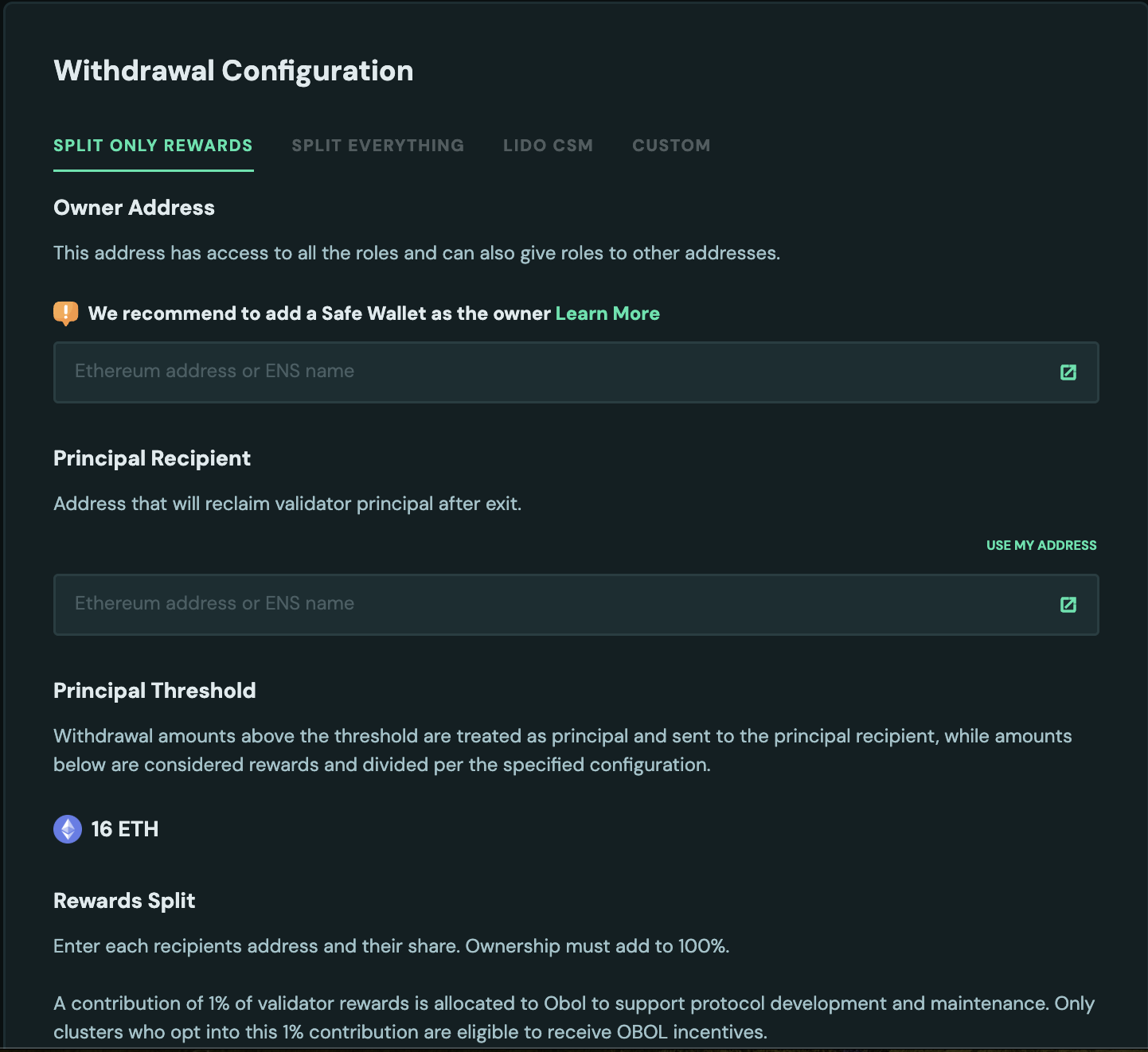
- Split only rewards: Deploys an OVM contract as withdrawal address to a principal address of your choice, and a splitter as fee recipient. OVM is used to distribute amounts to principal and fee recipient. It requires two inputs:
- Owner address: The Owner address is the super-admin of the OVM. It has access to all the roles - deposit, withdraw, distribute etc and it can also give roles to other addresses. For security purposes, it is recommended to either use a trusted address or a multi-sig wallet like SAFE so all the transactions are approved by a quorum of addresses inside the SAFE. For testing purposes on Hoodi, protofire can be used.
- Principal address: This is the address that will receive the amount after the principal threshold amount is crossed. Read more about it here where it is explained.
- Split Everything: Deploys an OVM contract as withdrawal address, with principal and fee recipient addresses both as splitter contracts. In this case both principal and rewards are distributed. It just requires Owner address as input which is again recommended to be a SAFE wallet.
- Lido CSM: Deploys the clusters with Lido's withdrawal vault as withdrawal address and execution vault as fee recipient. Read more about the process to register CSM cluster here.
- Custom: Enter the
Principal addresswhich should receive the principal 32 ETH and the accrued consensus layer rewards when the validator is exited. This can optionally be set to the contract address of a multisig / splitter contract. Enter theFee Recipient addressto which the execution layer rewards will go. This can be the same as the principal address, or it can be a different address. This can optionally be set to the contract address of a multisig / splitter contract.
-
Click
Create Cluster Configuration. Review that all the details are correct, and pressConfirm and SignYou will be prompted to sign two or three transactions with your wallet. These are:- The
config_hash. This is a hashed representation of the details of this cluster, to ensure everyone is agreeing to an identical setup. - The
operator_config_hash. This is your acceptance of the terms and conditions to participate as a node operator. - Your
ENR. Signing your ENR authorizes the corresponding private key to act on your behalf in the cluster.
- The
-
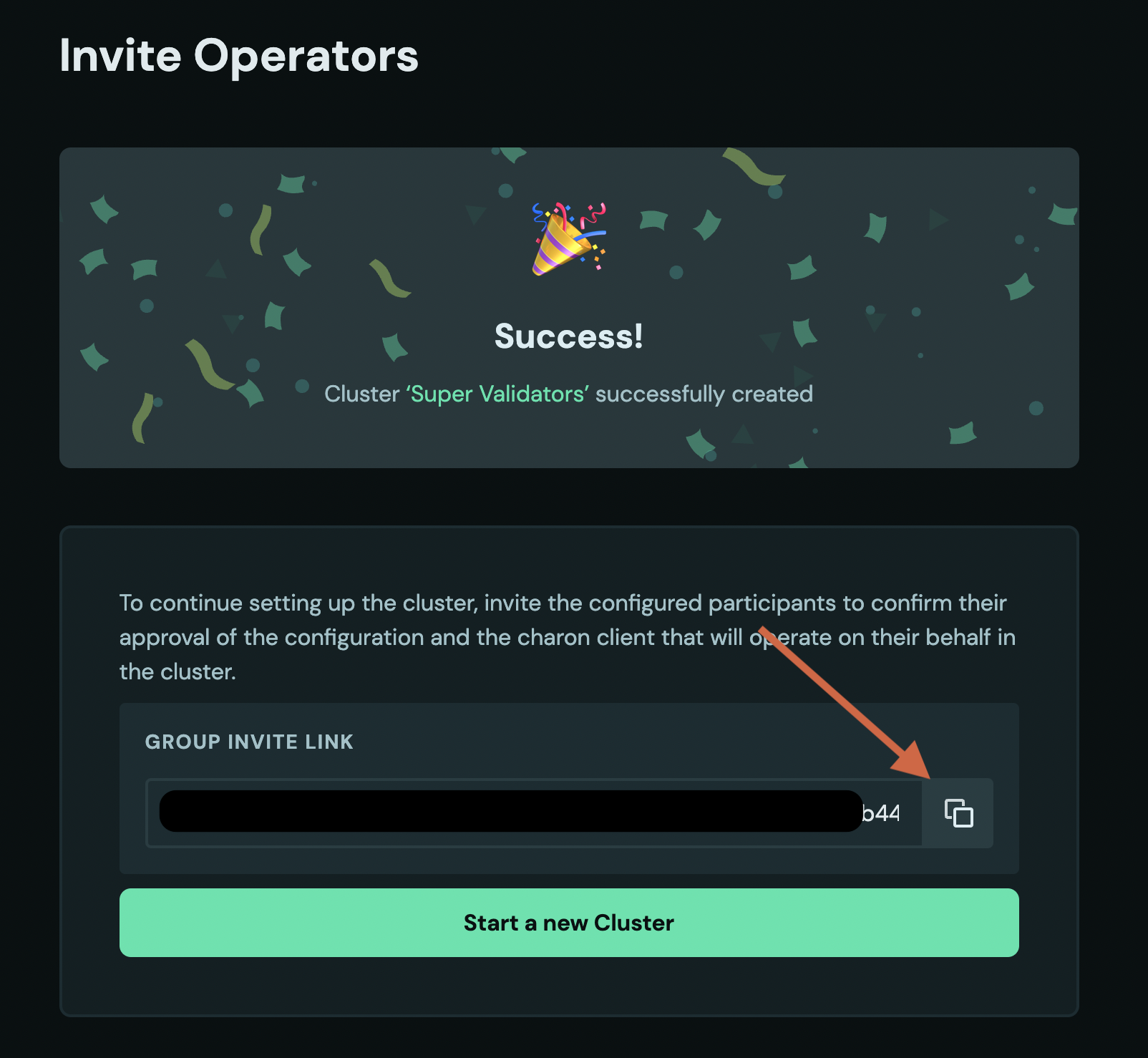
Share your cluster invite link with the operators. Following the link will show you a screen waiting for other operators to accept the configuration you created.
-
You can use the link to monitor how many of the operators have already signed their approval of the cluster configuration and submitted their ENR.
Once every participating operator is ready, the next step is the distributed key generation among the operators.
- If you are not planning on operating a node, and were only configuring the cluster for the operators, your journey ends here. Well done!
- If you are one of the cluster operators, continue to the next step.
You will use the CLI to create the cluster definition file, which you will distribute it to the operators manually.
-
The leader or creator of the cluster will prepare the
cluster-definition.jsonfile for the Distributed Key Generation ceremony using thecharon create dkgcommand. -
Populate the
charon create dkgcommand with the appropriate flags including thename, thenum-validators, thefee-recipient-addresses, thewithdrawal-addresses, and theoperator-enrsof all the operators participating in the cluster. -
Run the
charon create dkgcommand that generates DKG cluster-definition.json file.docker run --rm -v "$(pwd):/opt/charon" obolnetwork/charon:v1.11.0 create dkg--name="Quickstart"--num-validators=1--fee-recipient-addresses="0x0000000000000000000000000000000000000000"--withdrawal-addresses="0x0000000000000000000000000000000000000000"--operator-enrs="enr:-JG4QGQpV4qYe32QFUAbY1UyGNtNcrVMip83cvJRhw1brMslPeyELIz3q6dsZ7GblVaCjL_8FKQhF6Syg-O_kIWztimGAYHY5EvPgmlkgnY0gmlwhH8AAAGJc2VjcDI1NmsxoQKzMe_GFPpSqtnYl-mJr8uZAUtmkqccsAx7ojGmFy-FY4N0Y3CCDhqDdWRwgg4u"This command should output a file at
.charon/cluster-definition.jsonThis file needs to be shared with the other operators in a cluster.- The
.charonfolder is hidden by default. To view it, runls -al .charonin your terminal. Else, if you are onmacOS, pressCmd + Shift + .to view all hidden files in the Finder application.
- The
Once every participating operator is ready, the next step is the distributed key generation among the operators.
- If you are not planning on operating a node, and were only configuring the cluster for the operators, your journey ends here. Well done!
- If you are one of the cluster operators, continue to the next step.
Join the cluster prepared by the creator
Use the Launchpad or CLI to join the cluster configuration generated by the creator:
- Launchpad
- CDVN
Your cluster creator needs to configure the cluster, and send you an invite URL link to join the cluster on the Launchpad. Once you've received the Launchpad invite link, you can begin the cluster acceptance process.
-
Click on the DV launchpad link provided by the leader or creator. Make sure you recognize the domain and the person sending you the link, to ensure you are not being phished.
-
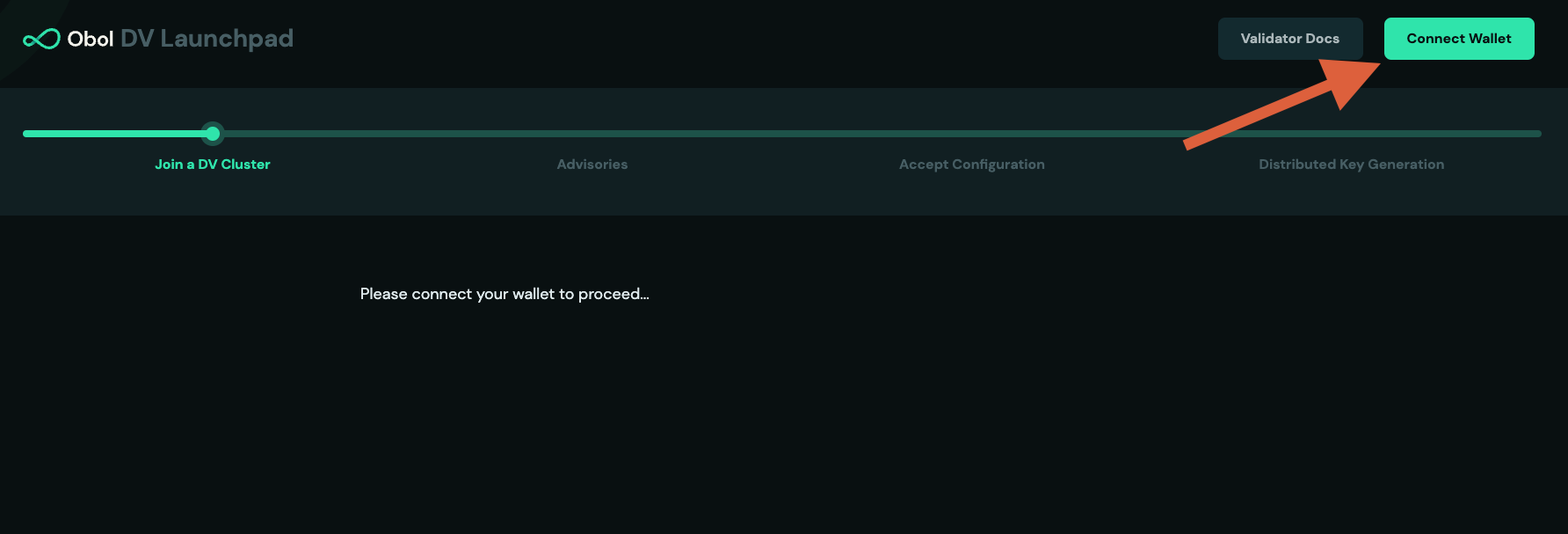
Connect your wallet using the Ethereum address the leader was provided.
-
Review the operators addresses submitted and click
Get Startedto continue.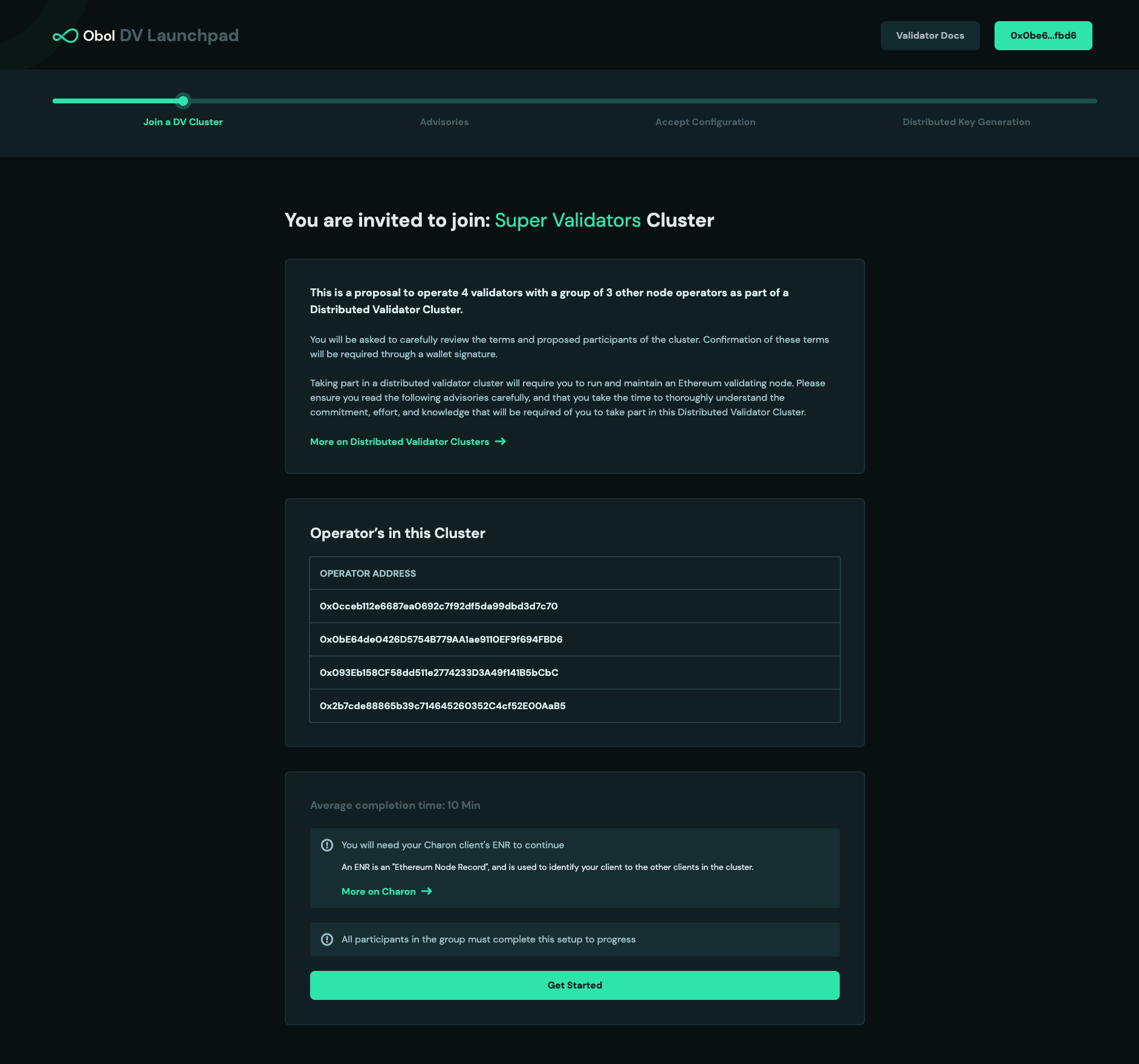
-
Review and accept the DV Launchpad terms & conditions and advisories.
-
Before accepting the invite and adding your ENR, ensure the following:
warningImportant: Review these details carefully before proceeding. Once you accept the cluster configuration, you'll be committed to the withdrawal and fee recipient addresses set by the creator.
- Withdrawal address verification:
- If the withdrawal address is an OVM (Obol Validator Manager):
- Make sure it has the OVM tag to ensure it's the correct and official version of the audited contract.
- Ensure the OVM owner is correct. If it's a SAFE contract, verify the SAFE and all addresses inside the SAFE are as expected.
- Verify that all roles are assigned correctly if required. Note that the owner can edit roles even after accepting the cluster invite. If you require roles to be permanent, ensure ownership is renounced before accepting.
- For more information on OVM roles, see the OVM role assignment guide.
- If the withdrawal address is an OVM (Obol Validator Manager):
- Fee recipient verification:
- If the fee recipient is a splitter contract, ensure the percentage of fee splits are correct.
- Just like OVM, fee recipient contracts also have an owner. Ensure that ownership is revoked if you want the shares to remain unchanged.
- Withdrawal address verification:
-
Review the cluster configuration set by the creator and add your
ENRthat you generated in step 1.\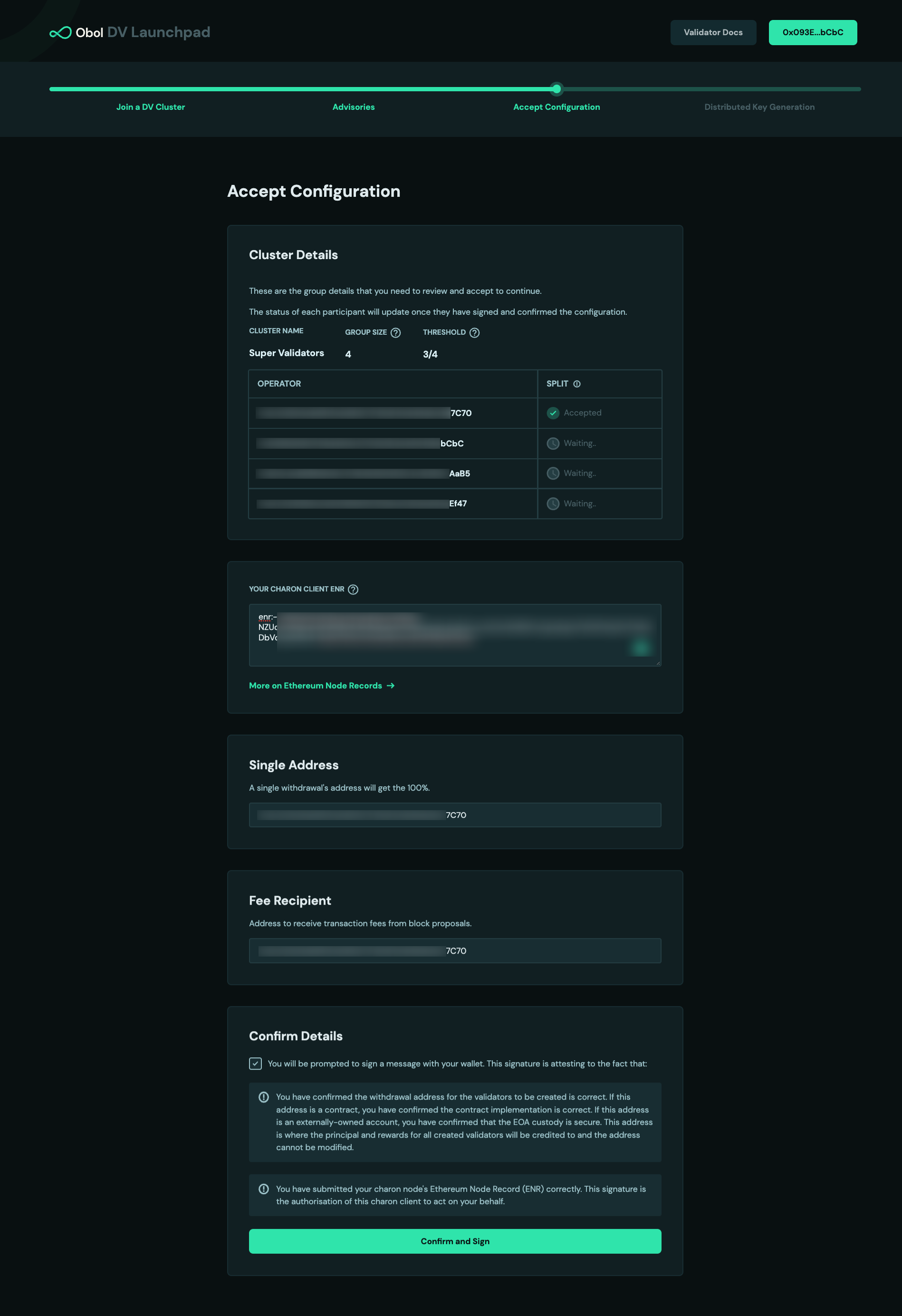
-
Sign the two transactions with your wallet, these are:
- The config hash. This is a hashed representation of all of the details for this cluster.
- Your own
ENRThis signature authorizes the key represented by this ENR to act on your behalf in the cluster.
-
Wait for all the other operators in your cluster to also finish these steps.
Once every participating operator is ready, the next step is the distributed key generation among the operators.
- If you are not planning on operating a node, and were only configuring the cluster for the operators, your journey ends here. Well done!
- If you are one of the cluster operators, continue to the next step.
You'll receive the cluster-definition.json file created by the leader/creator. You should save it in the .charon/ folder that was created initially. (Alternatively, you can use the --definition-file flag to override the default expected location for this file.)
Once every participating operator is ready, the next step is the distributed key generation among the operators.
- If you are not planning on operating a node, and were only configuring the cluster for the operators, your journey ends here. Well done!
- If you are one of the cluster operators, continue to the next step.
Step 3: Run the Distributed Key Generation (DKG) ceremony
For the DKG to complete, all operators need to be running the command simultaneously. It helps if operators can agree on a certain time or schedule a video call for them to all run the command together.
- Launchpad
- CDVN
- DappNode
- Sedge
- Helm
-
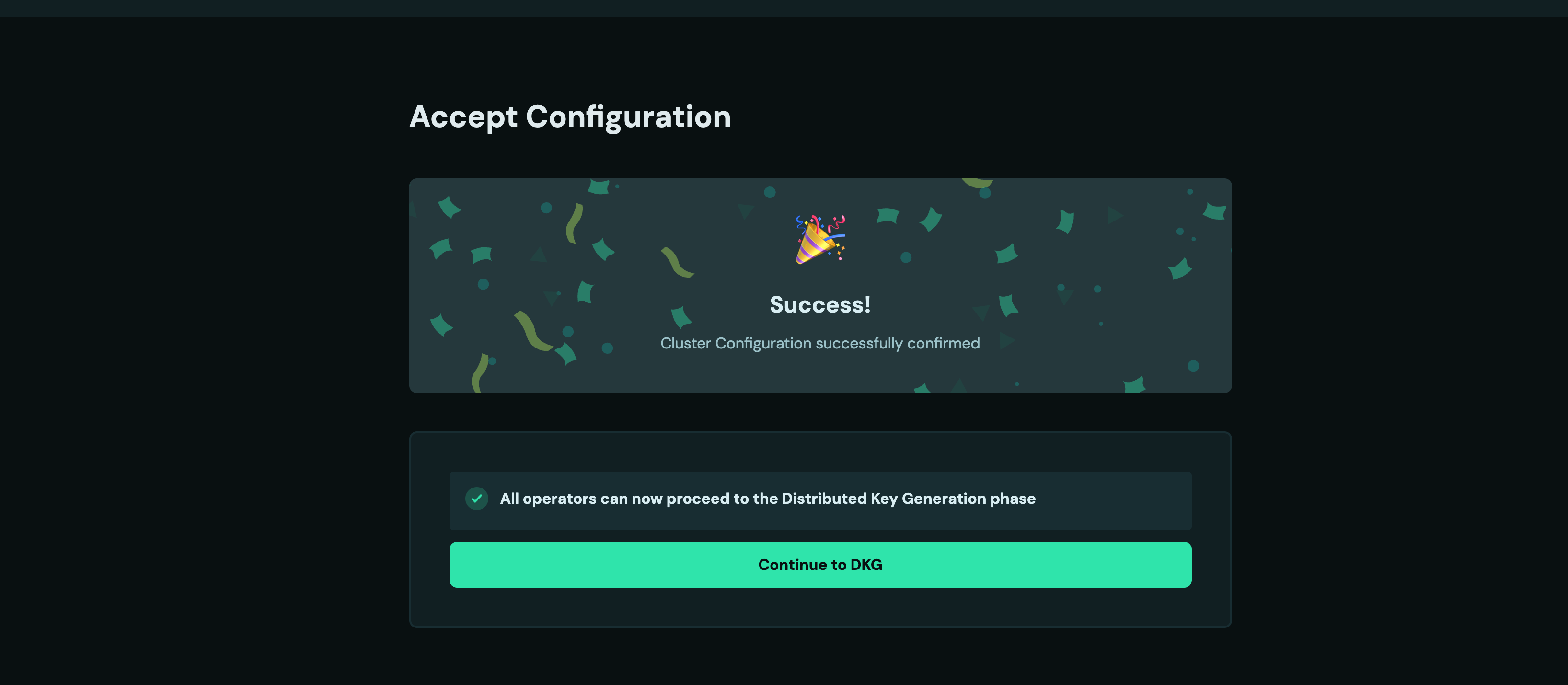
Once all operators successfully signed, your screen will automatically advance to the next step and look like this. Click
Continue. (If you closed the tab, you can always go back to the invite link shared by the leader and connect your wallet.)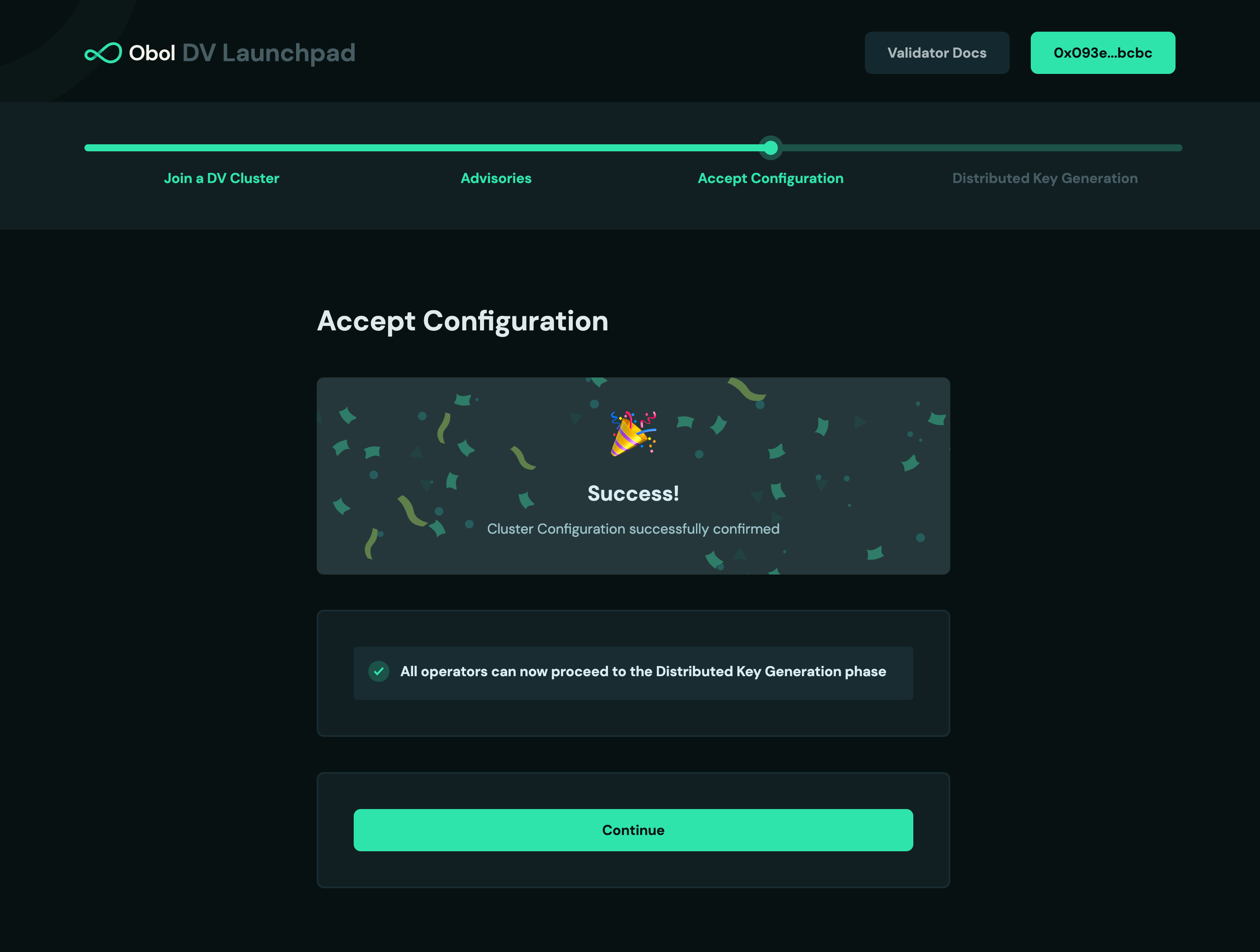
-
Copy and run the
dockercommand on the screen into your terminal. It will retrieve the remote cluster details and begin the DKG process.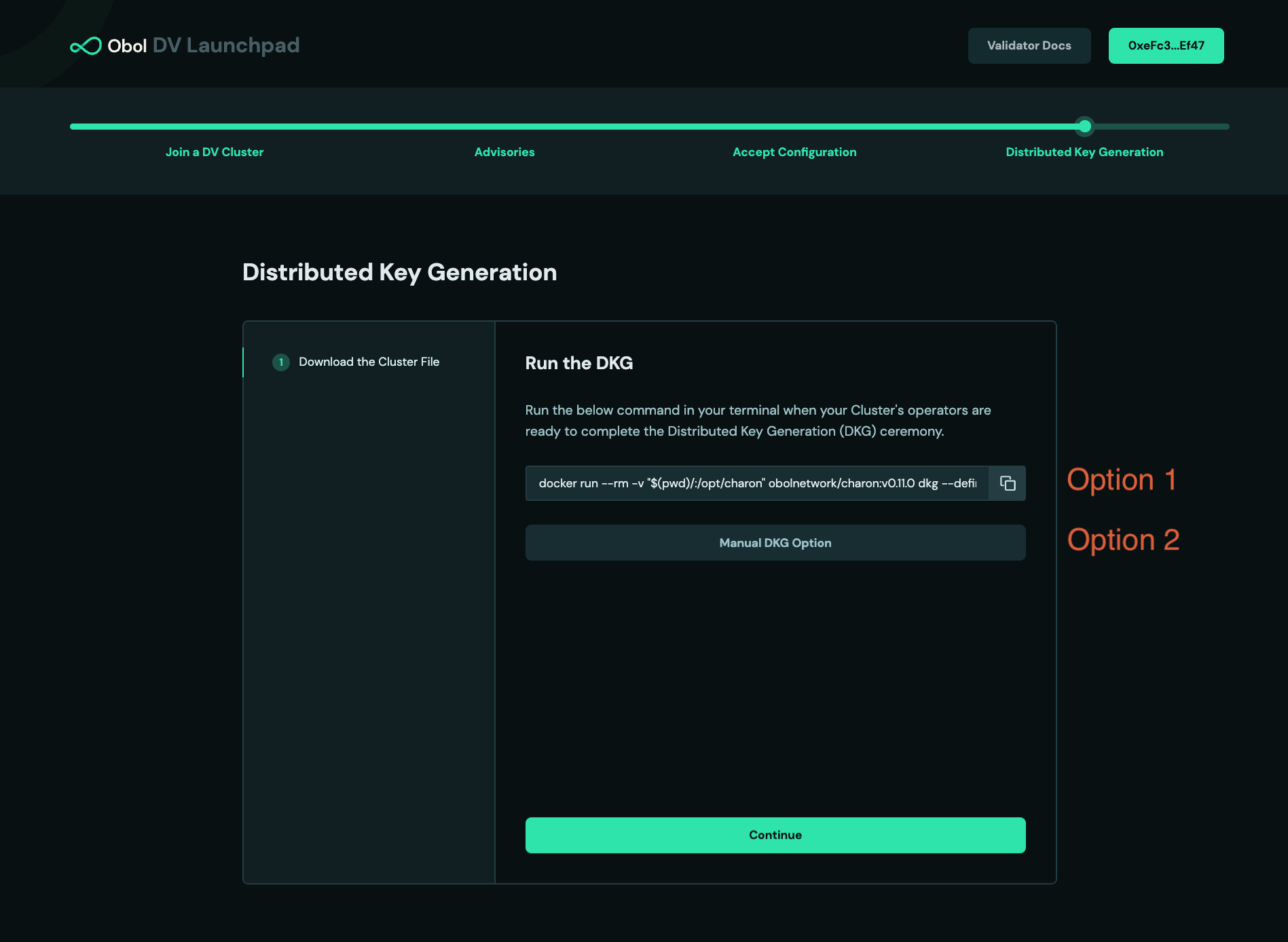
-
Assuming the DKG is successful, a number of artefacts will be created in the
.charonfolder of the node. These include:- A
deposit-data.jsonfile. This contains the information needed to activate the validator on the Ethereum network. - A
cluster-lock.jsonfile. This contains the information needed by Charon to operate the distributed validator cluster with its peers. - A
validator_keys/folder. This folder contains the private key shares and passwords for the created distributed validators.
- A
Once the creator gives you the cluster-definition.json file and you place it in a .charon subdirectory, run:
docker run --rm -v "$(pwd):/opt/charon" obolnetwork/charon:v1.11.0 dkg --publish
and the DKG process should begin.
Follow this step if you are signing through the DV Launchpad, importing the cluster definition URL into the DappNode package's config & then running the DKG inside the DappNode, followed by cluster run.
-
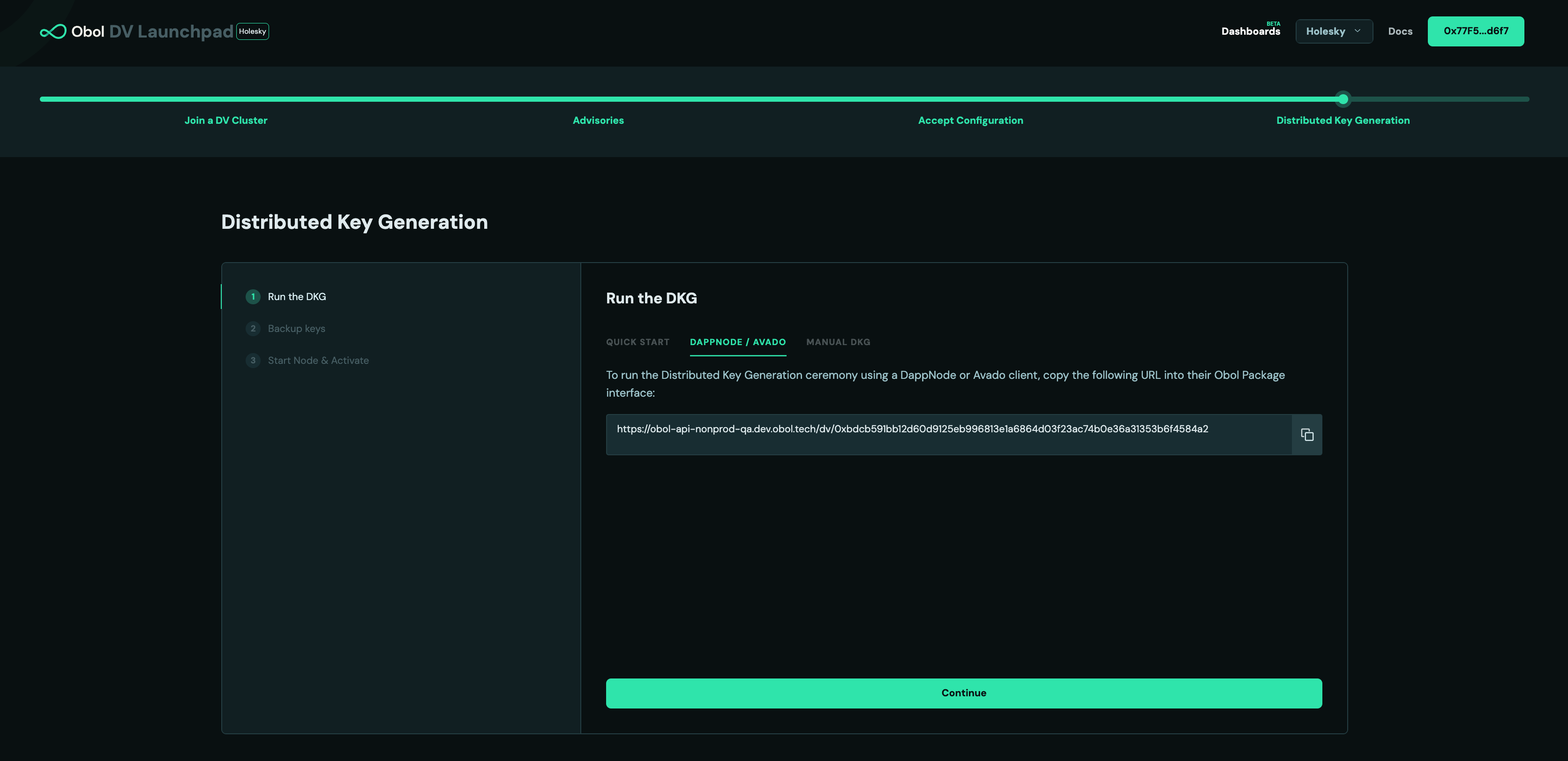
After all operators have signed with their wallet and has provided an ENR from the DappNode info tab, the Launchpad will instruct operators to begin the DKG ceremony. Click continue & navigate to the 'Dappnode/Avado' tab where the cluster definition URL is presented.
-
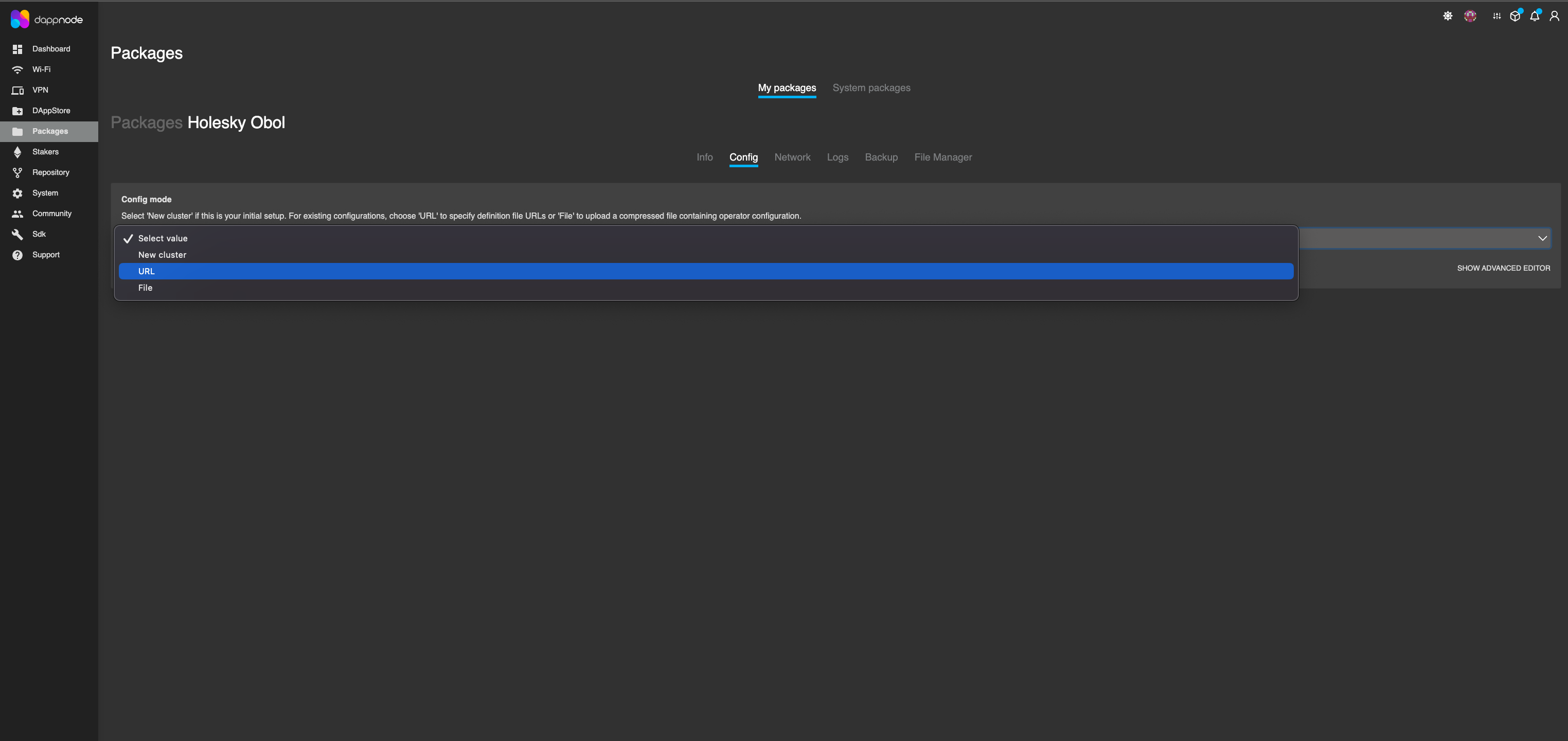
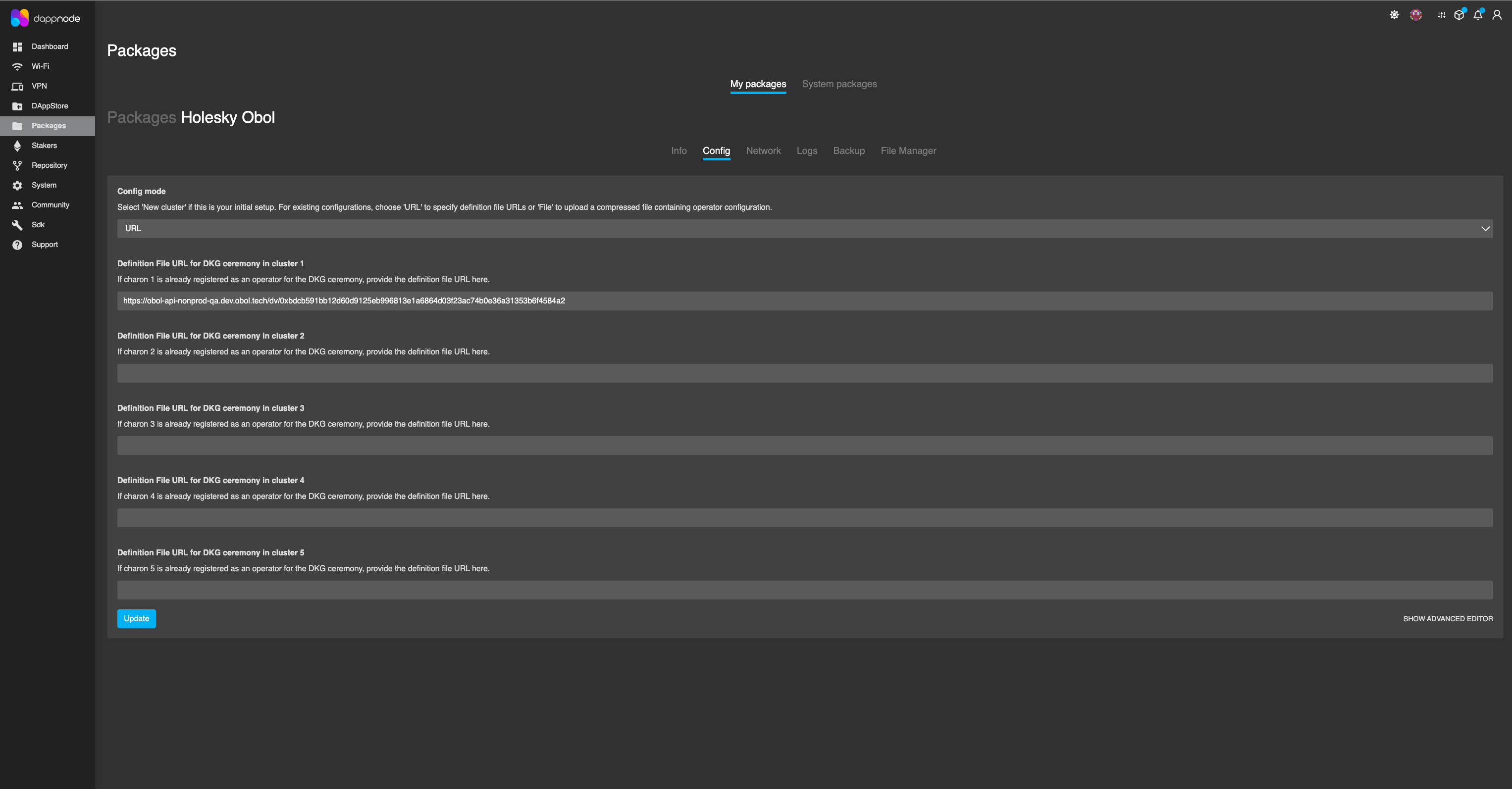
To run the Distributed Key Generation ceremony using a DappNode, you must paste the cluster definition URL into the Obol Package interface. Go to the 'Config' tab, select 'URL' from the dropdown menu, paste the cluster definition URL you retrieved from the launchpad, into the validator
cluster-*field which matches the cluster you took the ENR from. Example: If you picked ENR1 for signing, then you should paste the URL into Cluster-1. Finally, click the 'Update' button at the bottom of the page.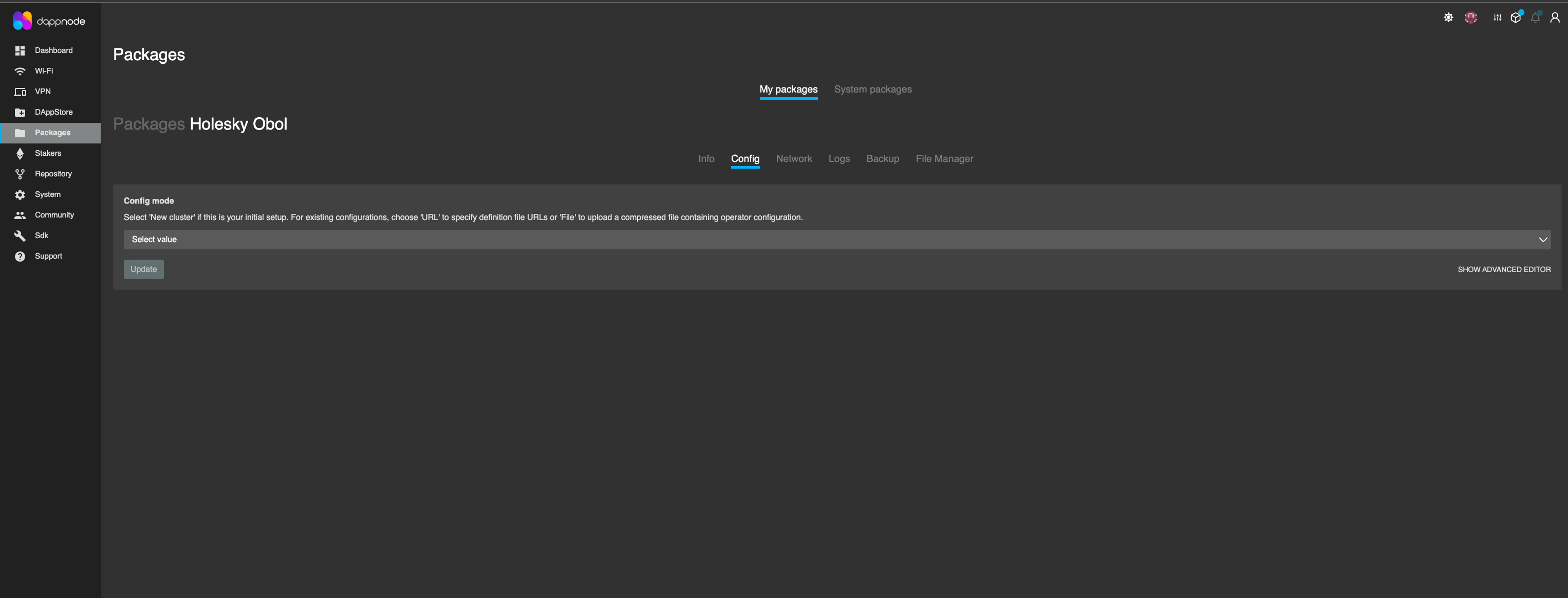
-
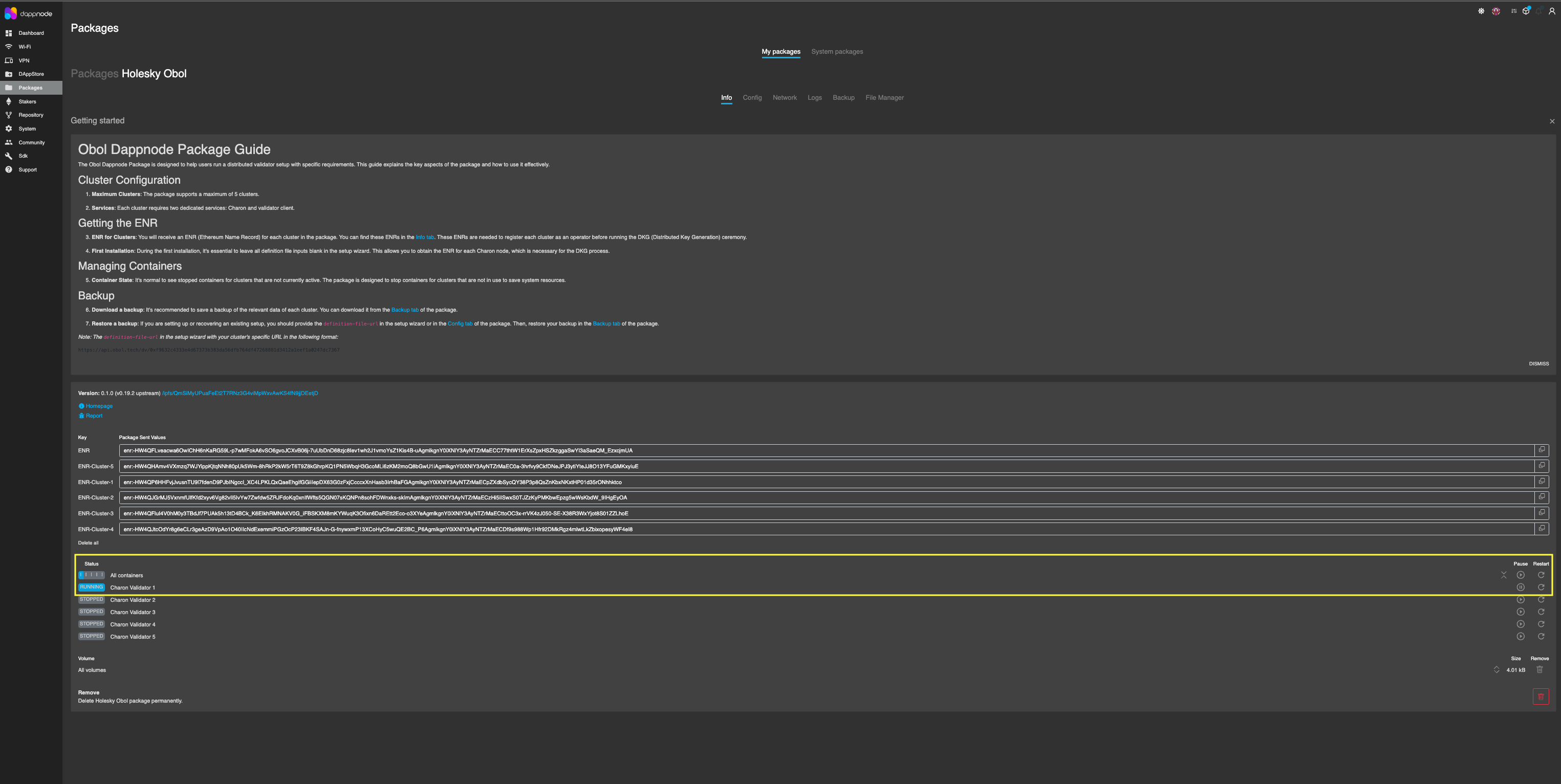
After DappNode records the cluster definition URL, go back to the 'Info' tab and restart the Charon container.
-
The node is now ready and will attempt to complete the DKG. You can monitor the DKG progress via the 'Logs' tab of the package. Once all clients in the cluster can establish a connection with one another and they each complete a handshake (confirm everyone has a matching
cluster_definition_hash), the key generation ceremony begins.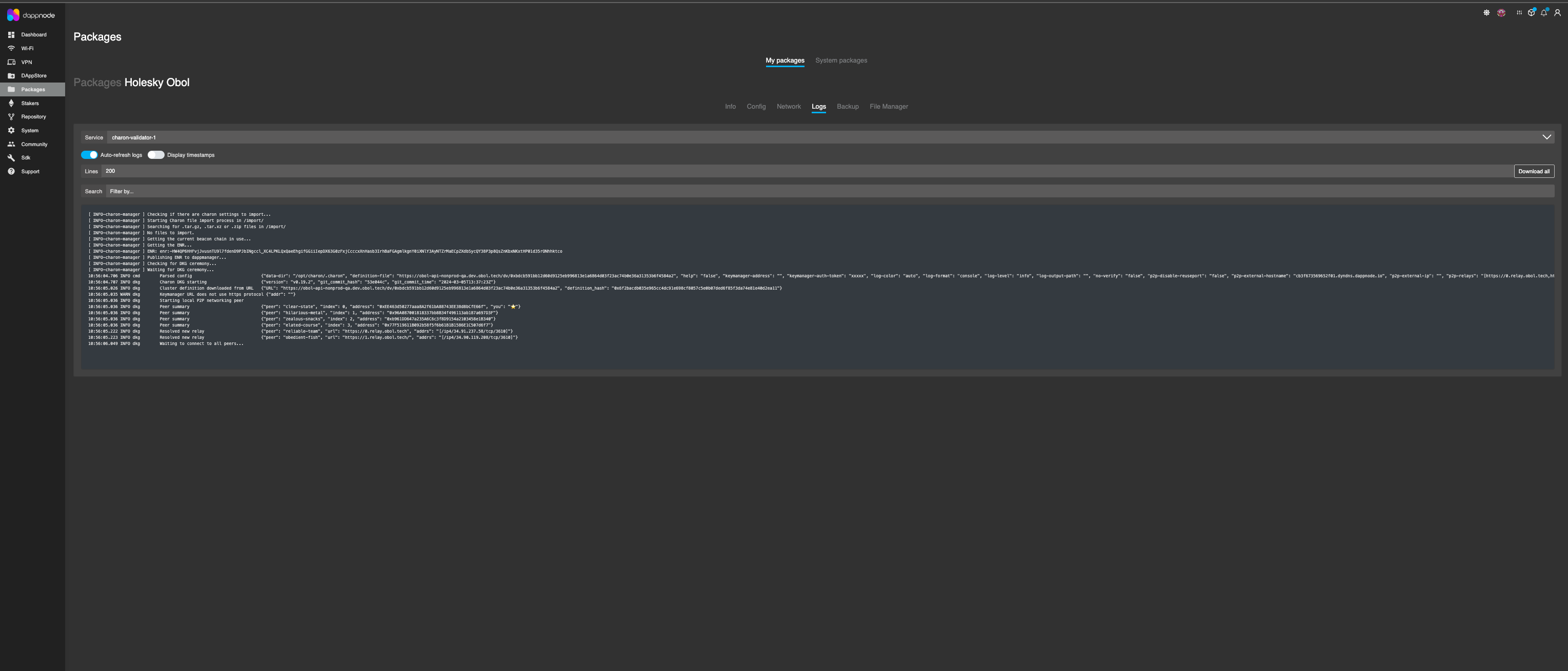
-
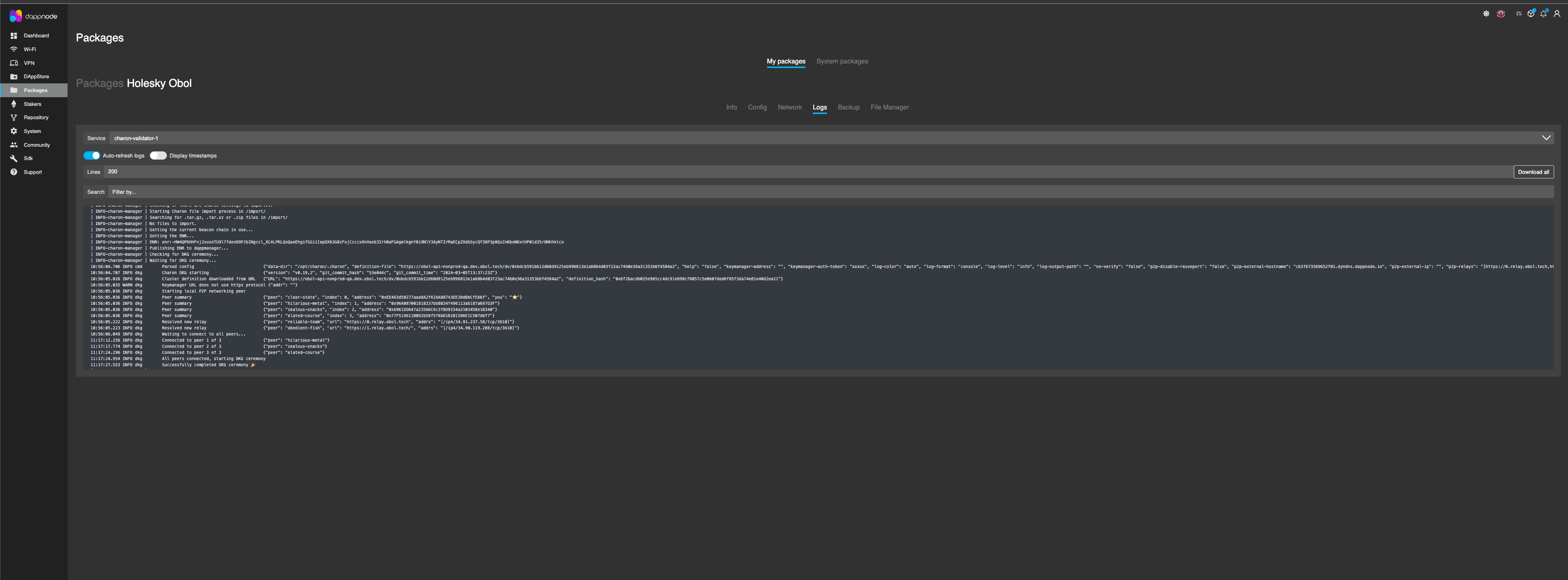
Example of DKG ceremony competed log.
Create a DV Node Backup
It is important to back up all artefacts generated by the DKG ceremony, and your node ENR private key. The below steps will show you how to download your keys & node artefacts.
-
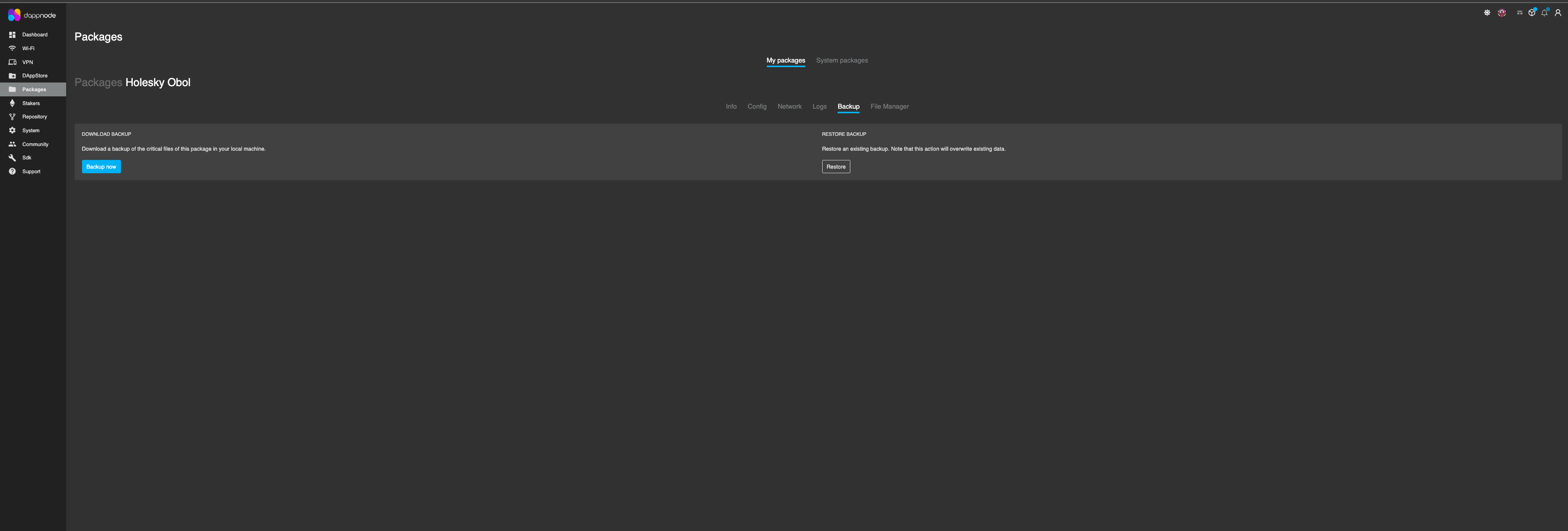
Navigate to the backup tab inside the Obol package.
-
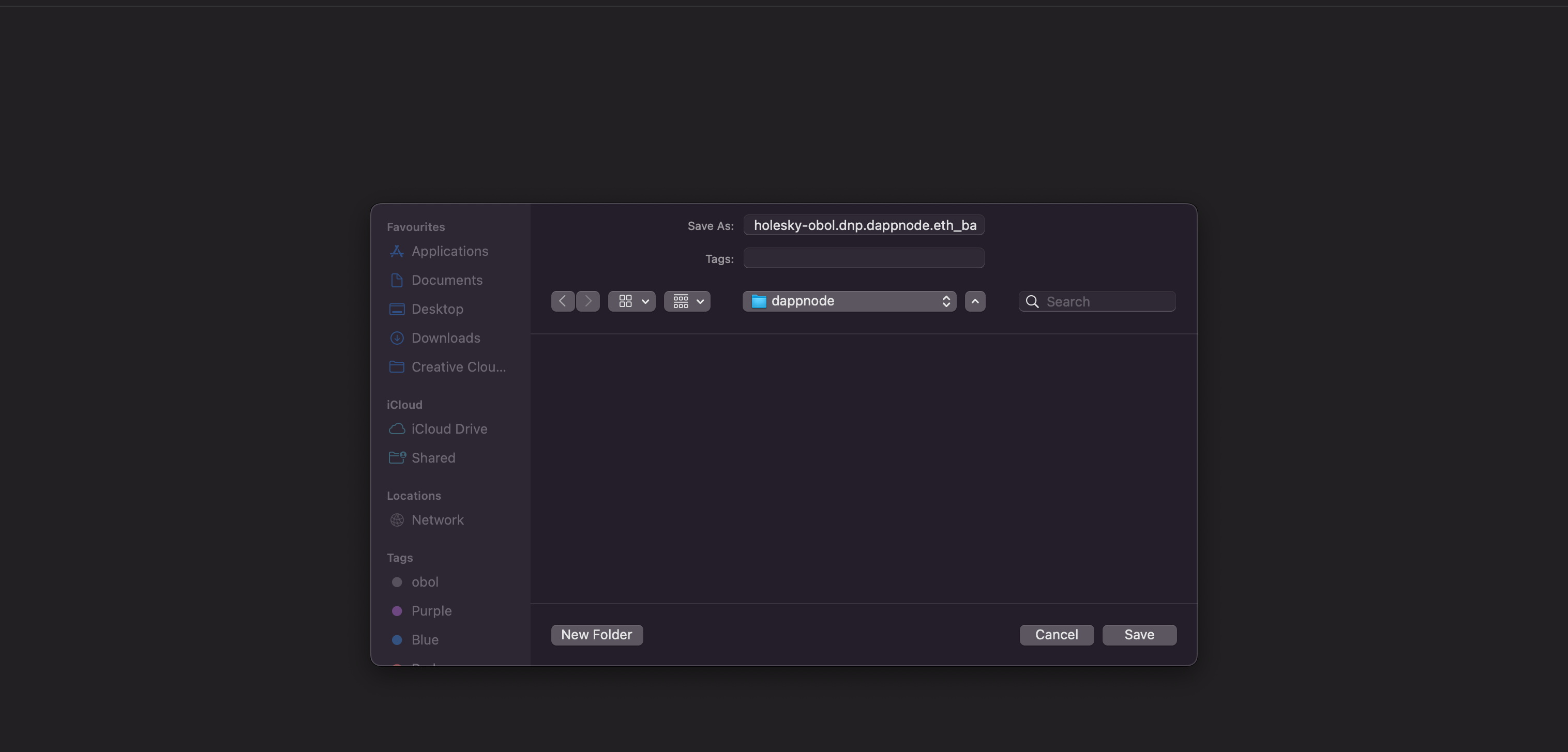
Click on the 'Backup now' button and it will open a new chrome window with a 'file save' option. Select the path where you want to save the Backup tar file.
-
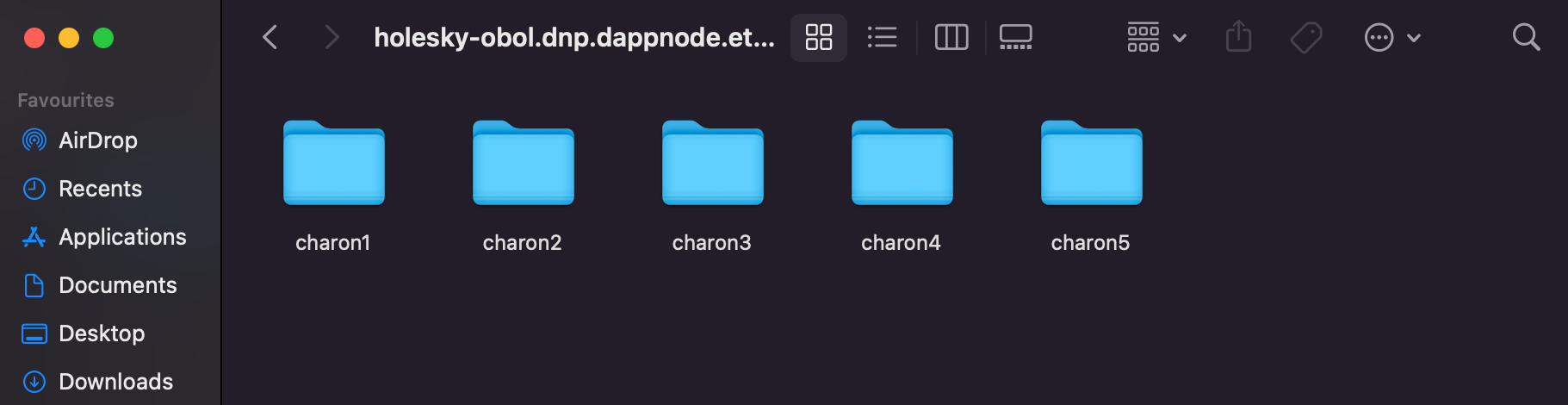
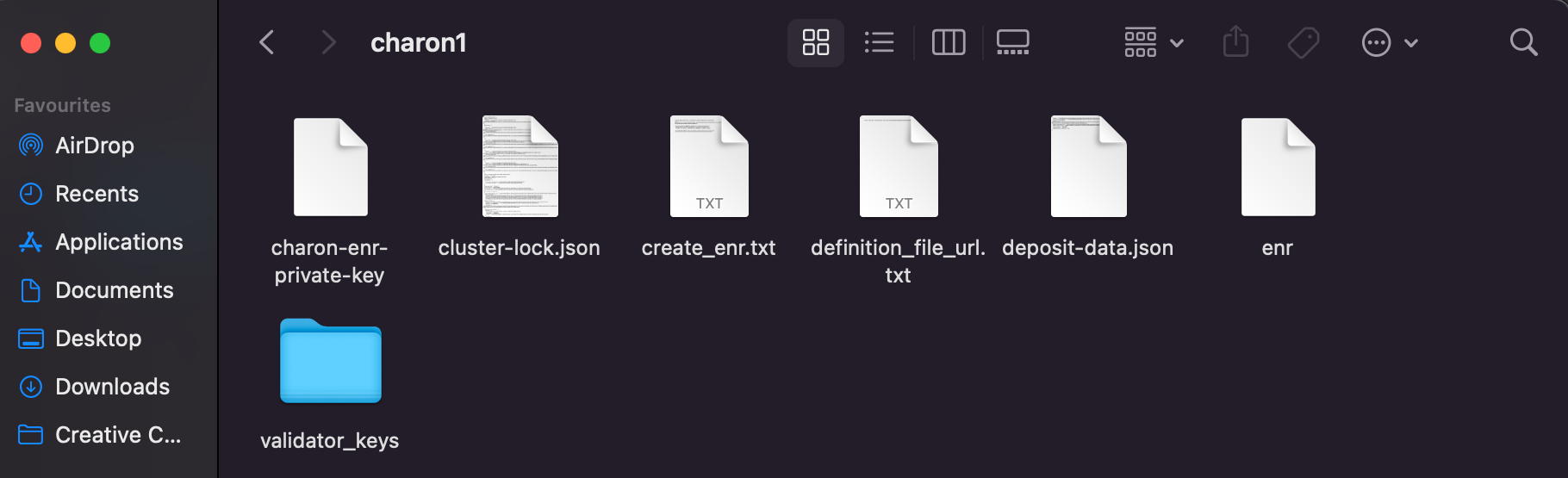
Double click to extract the tar file. There will be folders for each Charon node (max 5). Navigate to each node folder, and all artefacts related to each node will be present.
Sedge does not currently support taking part in a DKG. Follow the instructions for Launchpad to take part in the DKG with Charon, and in Step 4 you will import these keys into Sedge.
If you installed the chart in Step 1, the pod runs the ceremony for you. Keep it running until the DKG is done.
Launchpad invite (mode=launchpad):
The dkg-sidecar init container polls the Obol API for cluster invites to your operator address on the chart's network. It waits until it finds a definition that contains this pod's ENR and that every operator has signed on the Launchpad. Then the charon-dkg init container runs the ceremony and writes the cluster-lock and your validator key shares to the pod's persistent volume. Charon starts once the lock is in place.
The sidecar doesn't sign anything. You accept the cluster and sign with your operator wallet on the Launchpad yourself.
Cluster definition from the CLI (mode=definition):
If the creator made the cluster definition with charon create dkg --publish (the CDVN tab in Step 2) using your pod's ENR, point the same release at the definition's config hash instead:
helm upgrade my-dv-pod obol/dv-pod --version 0.22.0 -n dv-pod --reuse-values \
  --set mode=definition \
  --set dkg.definition.configHash=0x<CONFIG_HASH>
The pod keeps its ENR across the upgrade. The chart can also take the definition from an HTTPS URL (dkg.definition.url) or from a ConfigMap holding cluster-definition.json (dkg.definition.configMap).
Watch the DKG:
The sidecar records progress in the my-dv-pod-dkg-status ConfigMap:
kubectl get configmap my-dv-pod-dkg-status -n dv-pod \
  -o jsonpath='{.data.phase}{"\n"}{.data.message}{"\n"}{.data.signatures}{"\n"}'
The phase moves from WaitingForInvite to WaitingForSignatures (with a signatures count such as 3/4), then DefinitionReady and Complete. Failed comes with a message explaining why. For more detail, follow the init container logs:
kubectl get pod my-dv-pod-0 -n dv-pod                        # Init:N/M until the DKG is done
kubectl logs my-dv-pod-0 -n dv-pod -c dkg-sidecar -f         # waiting for the invite and signatures
kubectl logs my-dv-pod-0 -n dv-pod -c charon-dkg -f          # the ceremony itself
Charon's DKG only connects to peers on the same minor version, so every operator must run the same Charon minor (for example, all v1.11.x). The chart runs the DKG with the same Charon image it uses for charon run. Check which Charon version each operator runs before the ceremony, especially in clusters that mix Helm with Docker Compose setups.
If you have invites to more than one cluster, pin the one to join with --set charon.dkgSidecar.targetConfigHash=0x<CONFIG_HASH>.
Pre-existing artifacts:
If you have already completed the DKG ceremony outside of Helm (e.g., via docker), you can provide the artifacts directly. The ENR Secret must hold the private key whose ENR is in the cluster-lock:
kubectl create secret generic my-dv-pod-enr-key -n dv-pod \
  --from-file=charon-enr-private-key=.charon/charon-enr-private-key
kubectl create secret generic validator-keys -n dv-pod \
  --from-file=.charon/validator_keys/keystore-0.json \
  --from-file=.charon/validator_keys/keystore-0.txt
kubectl create configmap cluster-lock -n dv-pod \
  --from-file=.charon/cluster-lock.json

helm upgrade --install my-dv-pod obol/dv-pod --version 0.22.0 \
  --namespace dv-pod --create-namespace \
  --set mode=lock \
  --set network=hoodi \
  --set charon.enr.existingSecret.name=my-dv-pod-enr-key \
  --set configMaps.clusterLock=cluster-lock \
  --set validatorClient.keystores.secretName=validator-keys \
  --set 'charon.beaconNodeEndpoints[0]=<BEACON_NODE_ENDPOINT>'
For large cluster-lock files (>1MB), use --set mode=lockHash --set charon.lockHash=$(jq -r '.lock_hash' .charon/cluster-lock.json) instead of mode=lock and configMaps.clusterLock. The sidecar then fetches the lock from the Obol API.
Please make sure to create a backup of your .charon/ folder. If you lose your private keys you won't be able to start the DV cluster successfully and may risk your validator deposit becoming unrecoverable. Ensure every operator has their .charon folder securely and privately backed up before activating any validators.
The cluster-lock and deposit-data files are identical for each operator, if lost, they can be copied from one operator to another.
Now that the DKG has been completed, all operators can start their nodes.
Step 4: Start your Distributed Validator Node
With the DKG ceremony over, the last phase before activation is to prepare your node for validating over the long-term.
The CDVN repository is configured to sync an execution layer client (Nethermind) and a consensus layer client (Lighthouse) using Docker Compose. Further client combinations can be prepared using Sedge. You can also leverage alternative ways to run a node such as Ansible, Helm, or Kubernetes manifests.
- CDVN
- Existing BN
- Sedge
- Ansible
- Helm
- K8s
Currently, the CDVN repo has defaults for the Hoodi testnet and for mainnet.
Start by copying the appropriate .env.sample.<NETWORK> file to .env, and modifying values as needed.
# To prepare the node for the Hoodi test network
# Copy ".env.sample.hoodi", renaming it ".env"
cp .env.sample.hoodi .env

# To prepare the node for the main Ethereum network
# Copy ".env.sample.mainnet", renaming it ".env"
cp .env.sample.mainnet .env
In the same folder where you created your ENR in Step 1, and ran the DKG in Step 3, start your node in the DV cluster with docker compose.
# To be run from the ./charon-distributed-validator-node folder
# Spin up a Distributed Validator Node with a Validator Client
docker compose up -d
Do not start this node until the DKG is complete, as the Charon container will interfere with the Charon instance attempting to take part in the DKG ceremony.
If at any point you need to turn off your node, you can run:
# Shut down the currently running Distributed Validator Node
docker compose down
You should use the Grafana dashboard that accompanies the quickstart repo to see whether your cluster is healthy.
# Open Grafana dashboard
open http://localhost:3000/d/charonoverview/
In particular you should check:
- That your Charon client can connect to the configured beacon client.
- That your Charon client can connect to all peers directly.
- That your validator client is connected to Charon, and has the private keys it needs loaded and accessible. Most components in the dashboard have some help text there to assist you in understanding your cluster performance. You might notice that there are logs indicating that a validator cannot be found and that APIs are returning 404. This is to be expected at this point, as the validator public keys listed in the lock file have not been deposited and acknowledged on the consensus layer yet (usually it takes ~16 hours after the deposit is made).
Using a remote beacon node will impact the performance of your Distributed Validator and should be used sparingly.
If you already have a beacon node running somewhere and you want to use that instead of running an EL (nethermind) & CL (lighthouse) as part of the example repo, you can disable these images. To do so, follow these steps:
- Stop your docker compose
docker compose down
- Uncomment and set the
CHARON_BEACON_NODE_ENDPOINTSvariable in the.envfile to your beacon node's URL
...
# Connect to one or more external beacon nodes. Use a comma separated list excluding spaces.
CHARON_BEACON_NODE_ENDPOINTS=<YOUR_REMOTE_BEACON_NODE_URL>
...
If your existing beacon node is running in a another CDVN instance on the same Docker host, you can access it by specifying
http://host.docker.internal:5052 as the endpoint. Note: You will need to change the charon p2p port in the .env file (CHARON_PORT_P2P_TCP=) of the second CDVN stack to avoid port conflict.
- Uncomment
EL=el-noneandCL=cl-nonevariables in the.envfile and commentEL=el-nethermindandCL=cl-lighthousevariables:
...
#EL=el-nethermind
...
EL=el-none
...
#CL=cl-lighthouse
...
CL=cl-none
...
- Start your docker compose
docker compose up -d
To prepare a Distributed Validator node using sedge, we will use the sedge generate command to prepare a docker-compose file of our preferred clients, sedge import-key to import the artifacts created during the DKG ceremony, and sedge run to begin running the node.
Sedge generate
With Sedge installed, and the DKG complete, it’s time to deploy a Distributed Validator. Using the sedge generate command and its subcommands, Sedge will create a Docker Compose file needed to run the validator node.
-
The following command generates the artifacts required to deploy a distributed validator on the Hoodi network, using Teku as the validator client, Prysm as the consensus client, and Geth as the execution client. For additional supported client combinations, refer to the documentation here.
sedge generate full-node --validator=teku --consensus=prysm --execution=geth --network=hoodi --distributedYou should be shown a long list of configuration outputs with the following endings:
2024-09-20 12:56:15 -- [INFO] Generation of files successfully, happy staking! You can use now 'sedge run' to start the setup. -
Explore the config files.
You should now see a
sedge-datadirectory created in the folder where you ran thesedge generatecommand. To view the directory contents, use thelscommand.ls sedge-data> docker-compose.yml jwtsecret
Sedge Import-key
Use the following command to import keys from the directory where the .charon dir is located.
sedge import-key --from ./ hoodi teku
Sedge Run
After confirming the configurations and ensuring all files are in place, use the sedge run command to deploy the DV docker containers. Sedge will then begin pulling all the required Docker images.
> sedge run
2024-09-20 13:11:49 -- [INFO] [Logger Init] Log level: info
2024-09-20 13:11:49 -- [WARN] A new Version of sedge is available. Please update to the latest Version. See https://github.com/NethermindEth/sedge/releases for more information. Latest detected tag: fatal: not a git repository (or any of the parent directories): .git
2024-09-20 13:11:50 -- [INFO] Setting up containers
2024-09-20 13:11:50 -- [INFO] Running command: docker compose -f /sedge/sedge-data/docker-compose.yml build
2024-09-20 13:11:50 -- [INFO] Running command: docker compose -f /sedge-data/docker-compose.yml pull
[+] Pulling 16/44
 ⠇ consensus [⣀⠀⠀⠀⠀⠀⠀⠀⠀⠀⠀⠀⠀⠀⠀⠀⠀⠀⠀⠀⠀⠀⠀⠀] Pulling                                                                                                                                                     20.8s
   ⠙ b003b463d750 Downloading [===============>                                   ]   32.9kB/103.7kB                                                                                                14.2s
   ⠙ fe5ca62666f0 Waiting                                                                                                                                                                           14.2s
   ⠙ b02a7525f878 Waiting                                                                                                                                                                           14.2s
   ⠙ fcb6f6d2c998 Waiting                                                                                                                                                                           14.2s
   ⠙ e8c73c638ae9 Waiting                                                                                                                                                                           14.2s
   ⠙ 1e3d9b7d1452 Waiting                                                                                                                                                                           14.2s
   ⠙ 4aa0ea1413d3 Waiting                                                                                                                                                                           14.2s
   ⠙ 7c881f9ab25e Waiting                                                                                                                                                                           14.2s
   ⠙ 5627a970d25e Waiting                                                                                                                                                                           14.2s
   ⠙ 5cf83054c259 Waiting                                                                                                                                                                           14.2s
   ⠙ fec68abcb14d Waiting                                                                                                                                                                           14.2s
   ⠙ 4d5ad547ce94 Waiting                                                                                                                                                                           14.2s
   ⠙ e1ea80853e89 Waiting                                                                                                                                                                           14.2s
   ⠙ 17b1d7e8d99a Waiting                                                                                                                                                                           14.2s
   ⠙ 841a2fc14521 Waiting                                                                                                                                                                           14.2s
   ⠙ 55b44d28dd62 Waiting                                                                                                                                                                           14.2s
   ⠙ f3e3115c6547 Pulling fs layer                                                                                                                                                                  14.2s
   ⠙ 3cec53649029 Waiting                                                                                                                                                                           14.2s
   ⠙ 01739568079a Waiting                                                                                                                                                                           14.2s
   ⠙ c6bd24b188db Waiting                                                                                                                                                                           14.2s
   ⠙ fe8d2e9c9467 Waiting                                                                                                                                                                           14.2s
   ⠙ c151008cbec0 Waiting                                                                                                                                                                           14.2s
   ⠙ de1ef6c90686 Waiting                                                                                                                                                                           14.2s
   ⠙ 03d09d97b125 Waiting                                                                                                                                                                           14.2s
 ✔ execution Pulled                                                                                                                                                                                  9.3s
   ✔ a258b2a6b59a Pull complete                                                                                                                                                                      1.5s
   ✔ a2d6cf6afda3 Pull complete                                                                                                                                                                      1.7s
   ✔ a3dd8256fc41 Pull complete                                                                                                                                                                      6.9s
Once all docker images are pulled, sedge will create & start the containers to run all the required clients. See below for example output of the progress.
✔ 8db8b5d461a7 Pull complete                                                                                                                                                                     24.1s
   ✔ 2288b86b1d5f Pull complete                                                                                                                                                                     24.3s
   ✔ 4becb7b9a44b Pull complete                                                                                                                                                                     24.3s
   ✔ 4f4fb700ef54 Pull complete                                                                                                                                                                     24.3s
   ✔ 5c35e3728c84 Pull complete                                                                                                                                                                     35.1s
2024-09-20 13:12:45 -- [INFO] Running command: docker compose -f /sedge-data/docker-compose.yml create
[+] Creating 7/7
 ✔ Network sedge-network              Created                                                                                                                                                        0.1s
 ✔ Container sedge-dv-client          Created                                                                                                                                                        0.4s
 ✔ Container sedge-consensus-client   Created                                                                                                                                                        0.4s
 ✔ Container sedge-execution-client   Created                                                                                                                                                        0.4s
 ✔ Container sedge-mev-boost          Created                                                                                                                                                        0.4s
 ✔ Container sedge-validator-blocker  Created                                                                                                                                                        0.4s
 ✔ Container sedge-validator-client   Created                                                                                                                                                        0.1s
2024-09-20 13:12:45 -- [INFO] Running command: docker compose -f /sedge-data/docker-compose.yml up -d
[+] Running 4/5
 ✔ Container sedge-consensus-client   Started                                                                                                                                                        1.0s
 ⠧ Container sedge-validator-blocker  Waiting                                                                                                                                                      130.8s
 ✔ Container sedge-dv-client          Started                                                                                                                                                        1.0s
 ✔ Container sedge-execution-client   Started                                                                                                                                                        1.3s
 ✔ Container sedge-mev-boost          Started
Given time, the execution and consensus clients should complete syncing, and if a Distributed Validator has already been activated, the node should begin to validate.
If you encounter issues with using Sedge as part of a DV cluster, consider consulting the Sedge docs directly, or opening an issue or pull request if appropriate.
Use an Ansible playbook to start your node. See the repo here for further instructions.
If you installed the Helm chart in Step 1 and the DKG completed automatically in Step 3, your Distributed Validator node is already running. You can verify its status with:
kubectl get pod my-dv-pod-0 -n dv-pod                  # READY once Charon's /readyz passes
kubectl logs my-dv-pod-0 -n dv-pod -c dv-pod -f        # Charon (the container is named after the chart)
kubectl logs my-dv-pod-0 -n dv-pod -c validator-client -f
Back up charon-data:
The DKG output (cluster-lock.json, deposit-data*.json and your key shares in validator_keys/) lives on the pod's charon-data-my-dv-pod-0 volume. Copy it off the cluster and store it encrypted before you activate any validators:
kubectl cp dv-pod/my-dv-pod-0:/charon-data ./my-dv-pod-charon-data -c dv-pod
Key configuration options:
You can customize your deployment by upgrading the release with additional parameters:
helm upgrade my-dv-pod obol/dv-pod --version 0.22.0 -n dv-pod \
  --reuse-values \
  --set='charon.beaconNodeEndpoints[0]=<BEACON_NODE_ENDPOINT>' \
  --set='charon.builderApi=true' \
  --set='validatorClient.type=lighthouse'
Set charon.builderApi=true only if your beacon node is connected to MEV-boost and your cluster agreed to use MEV. Don't change network on an existing release.
The chart supports five validator client types: lighthouse (default), teku, nimbus, lodestar, and prysm.
External validator client:
If you prefer to run your own validator client outside the chart, disable the integrated one and point your external client at the Charon validator API:
helm upgrade my-dv-pod obol/dv-pod --version 0.22.0 -n dv-pod \
  --reuse-values \
  --set='validatorClient.enabled=false'
Your external validator client should connect to the Charon validator API as if it were a beacon node:
http://<RELEASE_NAME>.<NAMESPACE>.svc.cluster.local:3600
Monitoring:
Enable Prometheus service monitoring:
helm upgrade my-dv-pod obol/dv-pod --version 0.22.0 -n dv-pod \
  --reuse-values \
  --set='serviceMonitor.enabled=true'
Uninstalling:
helm uninstall my-dv-pod -n dv-pod
Uninstalling the Helm release removes the pod and its configuration. The charon-data volume and the ENR Secret are kept, but make sure you have backed up your validator keys and cluster artifacts before uninstalling. Only delete the volume and the Secret once you no longer need this node's keys.
If you encounter issues, consult the Helm chart documentation and its troubleshooting guide, or open an issue.
Use Kubernetes manifests to start your Charon client and validator client. These manifests expect an existing Beacon Node Endpoint to connect to. See the repo here for further instructions.
In a Distributed Validator Cluster, it is important to have a low latency connection to your peers. Charon clients will use the NAT protocol to attempt to establish a direct connection to one another automatically. If this doesn't happen, you should port forward Charon's p2p port to the public internet to facilitate direct connections. The default port to expose is :3610. Read more about Charon's networking here.
If you have gotten to this stage, every node is up, synced and connected, congratulations. You can now move forward to activating your validator to begin staking.
FAQ
What happens if I lose my ENR private key?
If you lose your ENR private key (.charon/charon-enr-private-key), you won't be able to participate in the DKG ceremony or start the DV cluster successfully. It's critical to back up this file securely before proceeding with the cluster creation process.
Can I change the cluster configuration after it's been created?
Once a cluster configuration has been created and signed by all operators, it cannot be changed. If you need to modify the cluster settings, you'll need to create a new cluster configuration and have all operators sign the new configuration.
What if one operator doesn't show up for the DKG ceremony?
All operators must participate simultaneously in the DKG ceremony for it to complete successfully. If an operator is unable to participate, you'll need to wait for them or create a new cluster configuration without that operator. It's recommended to schedule the DKG ceremony at a time when all operators can participate.
How do I know if my node is properly connected to the cluster?
You can verify your node's connection status by checking the Grafana dashboard (if using CDVN) or monitoring the Charon logs. Your Charon client should be able to connect to all peers directly, and you should see successful handshakes in the logs. The dashboard will show connection status for each peer in the cluster.
What should I do if the DKG ceremony fails?
If the DKG ceremony fails, check the logs for error messages. Common issues include network connectivity problems, mismatched cluster definitions, or operators not running the command simultaneously. Ensure all operators have the correct cluster-definition.json file and are running the DKG command at the same time. You may need to restart the DKG process after resolving any issues.
Can I use different client combinations for different operators in the cluster?
Yes, each operator can use different execution and consensus clients. The Charon client handles the coordination between different client implementations, so operators can choose the clients that work best for their infrastructure while still participating in the same distributed validator cluster.
What happens if I need to replace an operator in the cluster?
Replacing an operator can be done using the charon alpha edit replace-operator command for a single operator swap, or via validator consolidation when making larger changes. For more information, see the replacing operators guide.
How should I set the validator count for compounding rewards?
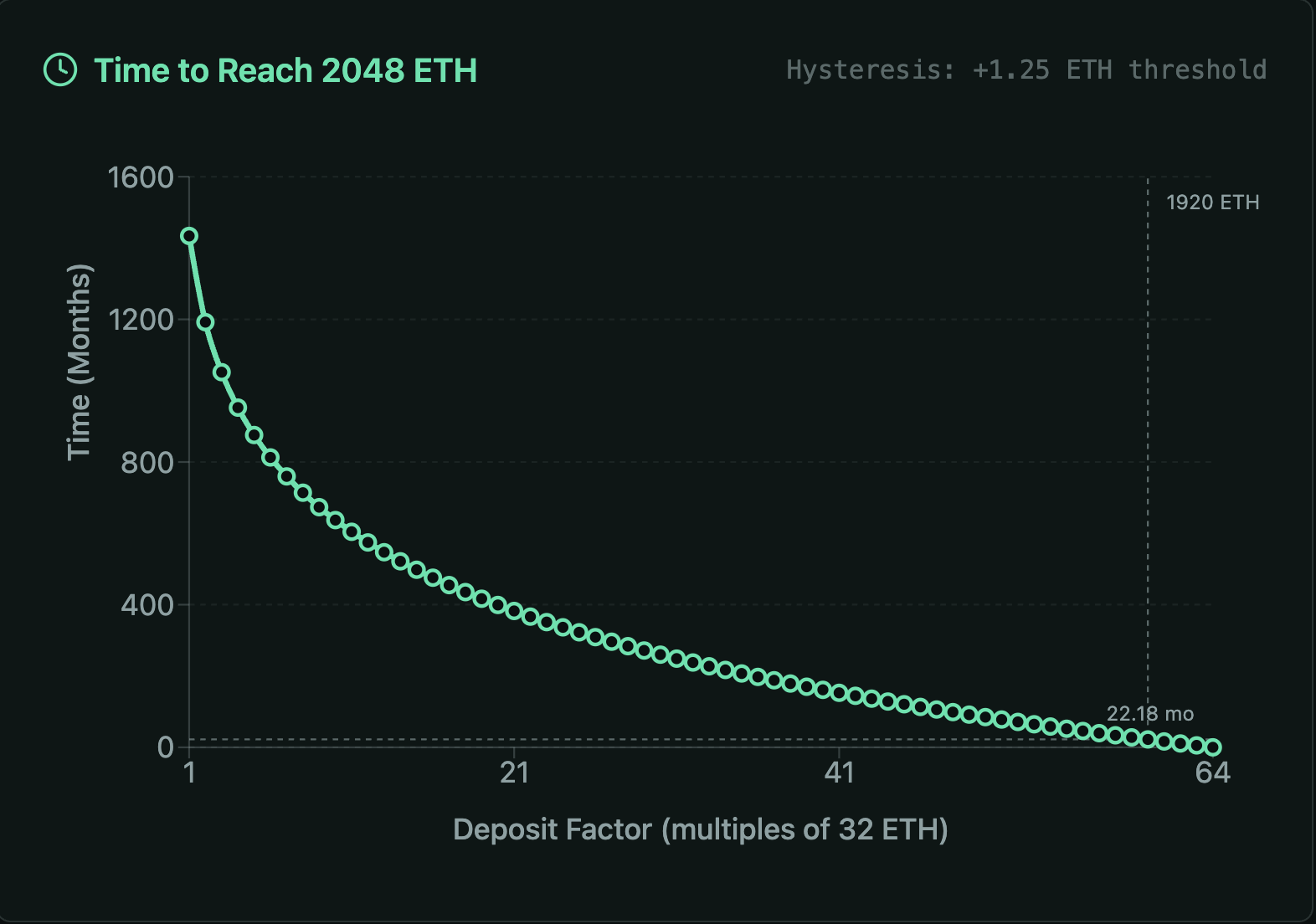
We recommend setting the validator count such that each validator's maxEB is capped at 1920 ETH, allowing rewards to compound for two years until it reaches 2048 ETH. Read more
Unlike a standard bank account where interest compounds daily, validator rewards follow a step-function. Your effective balance (which earns rewards) only increases when your real balance exceeds the current effective balance by 1.25 ETH. This "hysteresis" means growth is slightly slower than pure continuous compounding, as 'dust' rewards sit idle until they accumulate enough to trigger a balance update.
Recommendation: The 1920 ETH Strategy
To maximize compounding efficiency, avoid depositing the full 2048 ETH cap immediately. Leaving ~128 ETH of "headroom" allows your validators to compound rewards autonomously for approximately 2 years (at 3% APR) before hitting the 2048 ETH effective balance cap.