How to Assign Roles to Addresses in OVM
This guide explains how to assign permissions within the Obol Validator Manager (OVM) smart contract using its bitwise role system and outlines key security recommendations.
1. Understanding the Bitwise Role System
The OVM contract manages permissions by assigning each role a unique power-of-two value (a single binary bit). To grant multiple roles, you simply add (or bitwise OR) their values together to produce a single, final integer that the smart contract reads.
Contract Role Definitions
| Role Name | Decimal Value | Hex Value | Primary Purpose |
|---|---|---|---|
WITHDRAWAL_ROLE | 1 | 0x01 | Initiate validator withdrawals/claims. |
CONSOLIDATION_ROLE | 2 | 0x02 | Initiate validator consolidation (migration). |
SET_BENEFICIARY_ROLE | 4 | 0x04 | Set/change the principal/withdrawal address. |
RECOVER_FUNDS_ROLE | 8 | 0x08 | Emergency recovery of stuck assets. |
SET_REWARD_ROLE | 16 | 0x10 | Set/change the reward fee recipient address. |
DEPOSIT_ROLE | 32 | 0x20 | Submit validator deposit data. |
2. Guide to Assigning and Managing Roles
The easiest way to generate the required hex code is by using the dedicated calculator tool.
Step 1: Find the hex code (Using the Calculator)
Use the following interactive tool to instantly find the code for your required role combination:
- Select Roles: Go to the calculator and click the Checkboxes for all the roles you need to grant.
- Retrieve Code: The calculator will automatically calculate and display the final Total hex code (e.g.,
0x11) and Total Decimal Code (e.g., 17). Use the Total hex code in the next stage.
Step 2: Assign the Roles On-Chain
Roles are assigned using the grantRoles function on the OVM smart contract.
- Go to Etherscan: Navigate to the Block Explorer page for your deployed OVM smart contract.
- Access Write Contract: Click the "Contract" tab, and then the "Write Contract" sub-tab.
- Connect Wallet: Click "Connect to Web3" and connect the wallet that currently holds ownership of the OVM contract.
- Execute
grantRoles:- Find the function
grantRoles. user (address): Enter the wallet address you want to grant permissions to (this is the target operator's address).roles (uint256): Input the Decimal Value (e.g.,17) or Hex Value (e.g.,0x11) copied from the calculator.- Click "Write" and approve the transaction.
- Find the function

3. Review the Roles
- Assigned roles will show up in the Launchpad to the designated address.
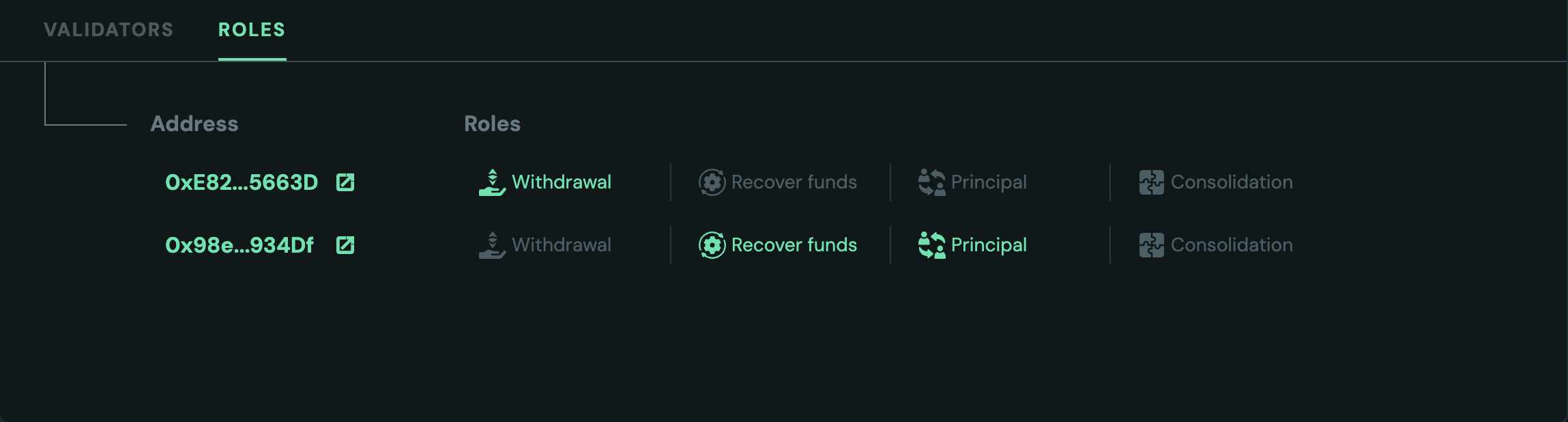
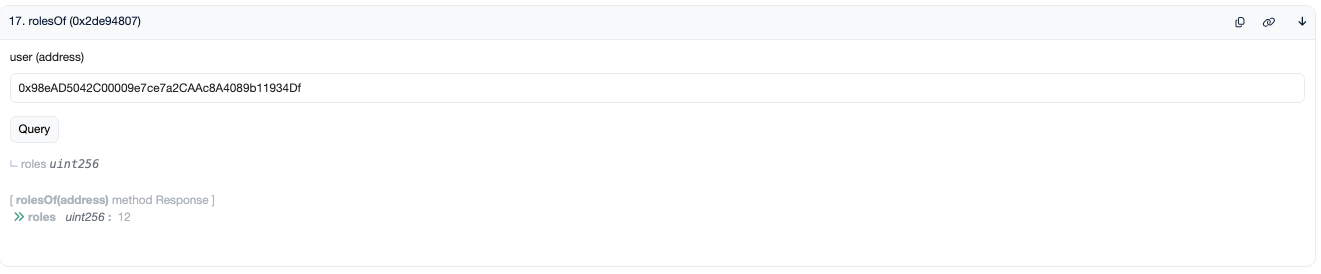
- Sometimes the Launchpad may take a short time to reflect role updates due to RPC issues.. Try refreshing if this occurs. You can also use Etherscan directly to confirm roles.
4. Security and Recommendations 🔒
The security of the cluster relies entirely on the assignment and control of these roles. Follow these best practices:
A. Principle of Least Privilege
- Avoid
0x3F(All Roles): Never grant the full combination code (0x3For 63) to any address that doesn't absolutely require it (like the primary owner/governance multi-sig). - Role Separation: Grant only the specific roles an operator needs for their job. For example:
- A technical operator managing deposits/withdrawals needs
WITHDRAWAL_ROLE(1),CONSOLIDATION_ROLE(2), andDEPOSIT_ROLE(32). - A separate, highly-trusted governance multi-sig should hold high-privilege roles like
SET_BENEFICIARY_ROLE(4),SET_REWARD_ROLE(16), andRECOVER_FUNDS_ROLE(8).
- A technical operator managing deposits/withdrawals needs
B. Ownership & Trust
- Secure the Owner: The address that can call
grantRolesandrevokeRolesis the most powerful. This address must be a hardware wallet or, ideally, a Gnosis SAFE multi-sig wallet. - Cluster Creation Timing: It is recommended to grant final roles before sharing cluster invites with external invitees. This ensures the security model is locked down before the cluster scales.
- Renounce Ownership (Conditional): If the cluster's roles are intended to be fixed forever (e.g., in a fully immutable system), you can renounce ownership after setting the final roles. However, if any role needs to be modifiable later (like changing the fee recipient), the owner must retain the ability to execute
grantRoles.

5. Miscellaneous: How does Bitwise Logic Work?
The final hex code is generated by the Bitwise OR operation. Since every role value is a unique power of two, the code for any combination is simply the sum of the desired decimal values.
| Role Combination Requested | Decimal Addition | Bitwise OR (Binary) | Final hex code |
|---|---|---|---|
| WITHDRAWAL and DEPOSIT | 1+32=33 | 000001 | 100000 = 100001 | 0x21 |
| CONSOLIDATION and SET_REWARD | 2+16=18 | 000010 | 010000 = 010010 | 0x12 |
| All 4 Basic Roles | 1+2+4+8=15 | 000001 | 000010 | 000100 | 001000 = 001111 | 0x0F |