Push Metrics and Logs to Obol
This is optional but encouraged, and does not confer any special privileges within Obol.
Metrics
Metrics are statistics that are gathered on a periodic basis and used to visualize the health and performance of your Charon node and DV cluster. These metrics power your local Grafana dashboard, as well as the hosted dashboards. Submitting metrics to the Obol Core team will allow you to see advanced performance analytics on Obol's hosted platform, as well as to opt into automated alerting whenever something goes wrong with your node.
- (L)CDVN Quickstart
- Dappnode
- DV-Pod
This is for operators using the example repo from our quickstart guide (or Lido equivalent), and have been provided with Monitoring Credentials used to push Distributed Validator metrics to Obol's central Prometheus cluster to monitor, analyze, and improve their Distributed Validator Cluster's performance. (For example, this is necessary to participate in the Obol Techne credential program.)
Update the monitoring token in the .env file
- Inside your
.envfile, uncomment thePROM_REMOTE_WRITE_TOKENline by removing the#symbol. - Enter your monitoring token in the format shown below:
PROM_REMOTE_WRITE_TOKEN=your_monitoring_token
Save the .env file and restart Prometheus
Save the .env file, and run the docker compose up -d command, and prometheus will be restarted to apply the changes.
docker compose up -d
# Alternatively
docker compose restart prometheus
The last step in your DappNode setup is to add your Monitoring Credentials. This allows you to push distributed validator metrics to Obol’s central Prometheus cluster for monitoring, analysis, and performance optimization of your Distributed Validator Cluster. It also facilitates easier troubleshooting with the Obol team when needed.
-
Get Prometheus credentials from Obol, which will look like:
obol20tnt8UC... -
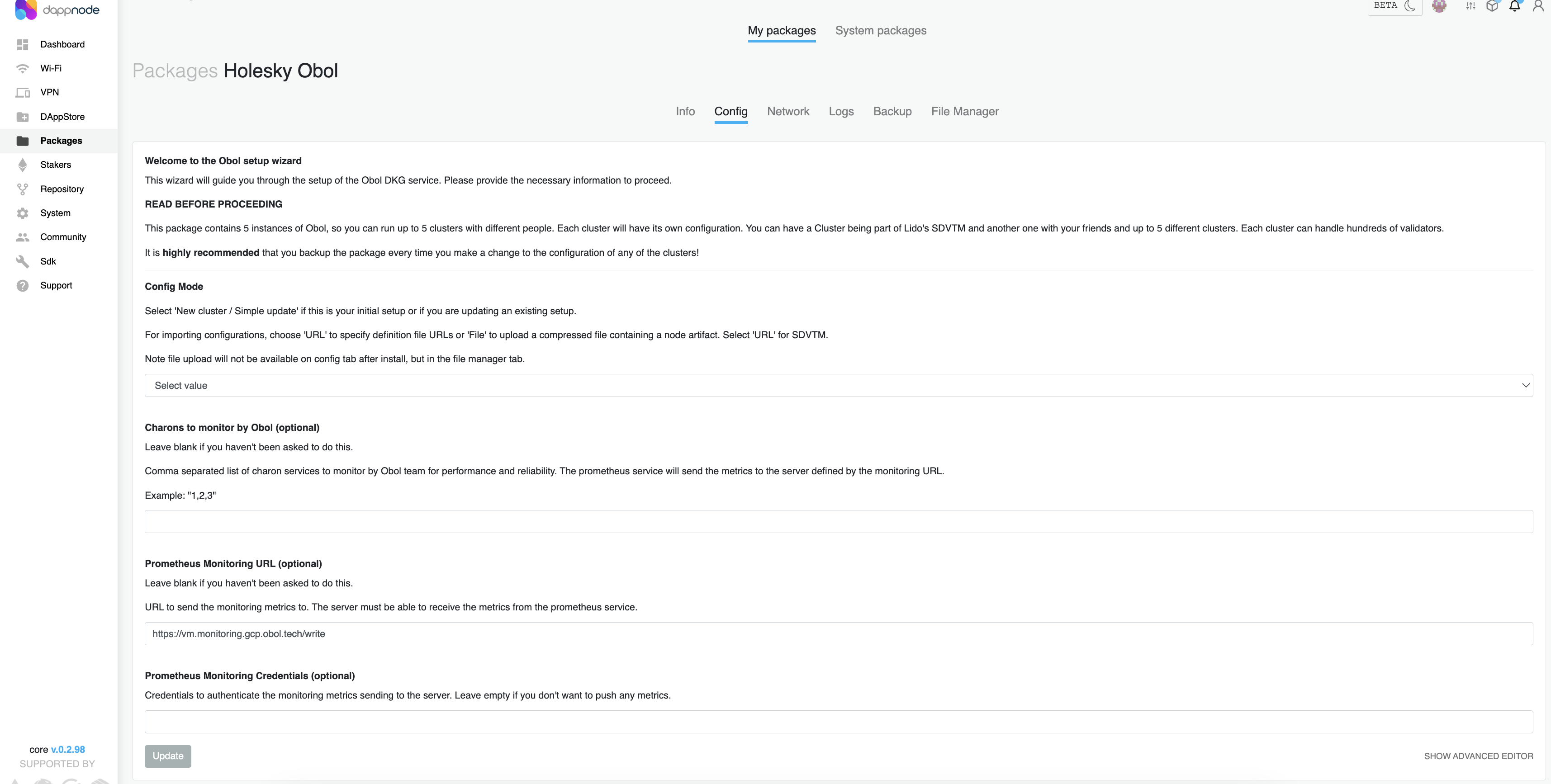
Navigate to your Obol package in DappNode and go to the Config tab.
-
At the bottom of the page, add the credential token under Prometheus Monitoring Credentials (optional), then click the Update button.
-
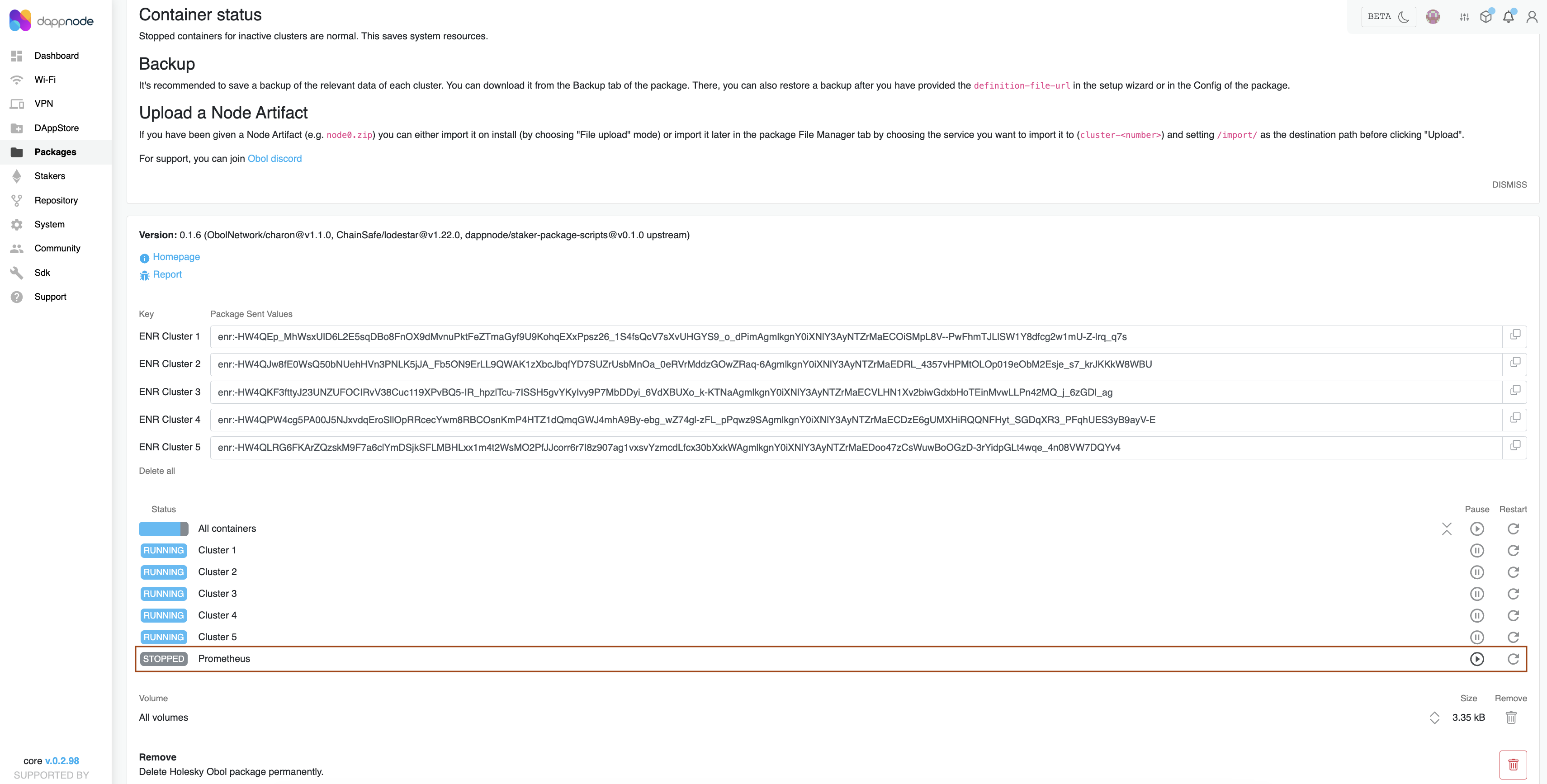
Return to the Info tab, scroll down to the Containers section, and click the down arrow to view all container statuses. If the Prometheus container is stopped, please restart it.
Get a Prometheus monitoring credential from the Obol core team, it will look like:
obol20tnt8UC...
Then, either add --set centralMonitoring.enabled=true --set-string centralMonitoring.token='YOUR_TOKEN_HERE' to your helm install command, or if using a Values.yaml file, update centralMonitoring.enabled to true, and centralMonitoring.token to the monitoring credential you have been given, and then install/upgrade the chart.
# -- Central Monitoring
centralMonitoring:
  # -- Specifies whether central monitoring should be enabled
  enabled: true
  # -- https endpoint to obol central prometheus
  promEndpoint: "https://vm.monitoring.gcp.obol.tech/write"
  # -- The authentication token to the central Obol prometheus instance
  token: "YOUR_TOKEN_HERE"
Logs
Metrics show the performance of a cluster, but sometimes, there is reason to go into deeper detail of a clusters runtime, by reviewing its logs. Sometimes logs from the Charon client alone are sufficient, but often times (for example in the case of a missed proposal), the logs from other parts of the stack are necessary to debug a situation (e.g. a MEV-sidecar and a beacon node).
An Obol core team member will give you a URL to send your logs to, and if feasible, sending all logs is preferable to sending only Charon logs. In custom deployments that might not be convenient or feasible, and sending only Charon logs may suffice. Follow the instructions below to configure automated log submission.
- All Logs
- Charon Logs Only
If you are using one of our Quickstart repos, you should uncomment the CHARON_LOKI_ADDRESSES environment variable, and save the URL provided to you by the Obol team as the value, you should also uncomment MONITORING=${MONITORING:-monitoring},monitoring-log-collector to enable the Alloy container, which collects logs from all containers and submits them to Obol. Once you've saved these changes to your .env file, you should run docker compose up -d to (re)start the containers as needed.
# Uncomment and set the log URL
CHARON_LOKI_ADDRESSES="URL here"

# Uncomment both and set to the details of your node, otherwise the core team won't be able to isolate your logs among all the others
CLUSTER_NAME="The name of your cluster"
CLUSTER_PEER="The name of your peer. e.g. approachable-chair, unsightly-couch"

# Uncomment
MONITORING=${MONITORING:-monitoring},monitoring-log-collector
Given a URL, you can either pass it to Charon as an additional flag to charon run, or by setting an environment variable on the Charon container.
--loki-addresses="URL here"
Or:
CHARON_LOKI_ADDRESSES="URL here"