How Does Distribution Work?
The distribution action allows the user to distribute funds from their OVM and splitters to the claim address. As a result, the distribution action is only available when either the withdrawal address is an OVM or the fee recipient of the withdrawal configuration is a splitter address. Once amounts are distributed, they can be claimed on the operator page or home page of the launchpad.
Overview
-
The distribution action allows users to transfer the distributable amount as principal or rewards. It comprises of two actions in a single click:
- Transfer the amount from OVM balance to Principal recipient or Rewards Recipient, depending on whether the OVM's Balance has crossed the Principal Threshold.
- If the Rewards Recipient is a splitter contract, split the amount according to respective share of addresses in the splitter config and transfer it to the warehouse contract where the amount is ready to be claimed. The amount from all the various splitter warehouses can be claimed from the main Operator Dashboard.
-
The distribution applies to the full available amount. On clicking distribute, the user will see the following modal:
- The fields are explained below:
- You are distributing: This is the sum of your OVM Balance + Splitter's Balance that will be distributed. First the OVM is distributed and then the splitter.
- Total Validator Balance: Total Validator Balance of all the validators associated to this OVM - principal + rewards
- Principal Threshold: Amount of ETH required in your OVM balance to be classified as Principal in order for it to be sent to the Principal Recipient. To cross the threshold, withdraw more ETH using the withdrawal flow or exit the validators.
- The fields are explained below:
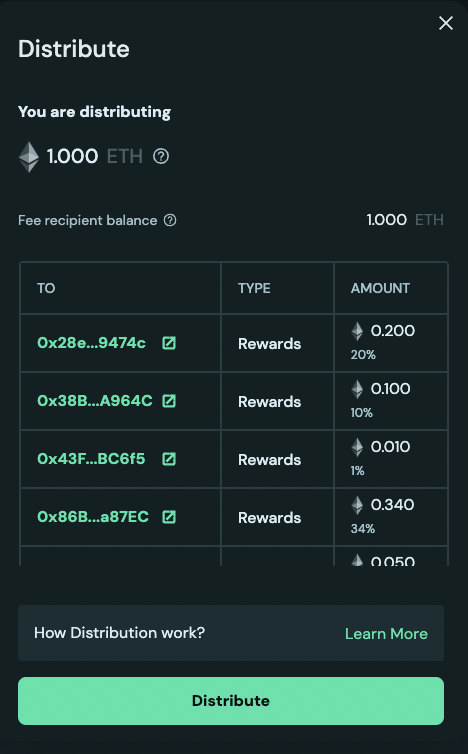
-
The table shows where the principal or rewards flow to after distribution. When the reward recipient is a splitter, rewards are not sent directly to the addresses in the splitter configuration. Instead, they become available to claim from the operator distributions page. If a user is part of multiple splitter configurations, it is recommended to distribute across all of them and claim all at once to optimize for gas fees paid. To learn more about the logic of distribution, read the Understanding Distribution in Detail section.
-
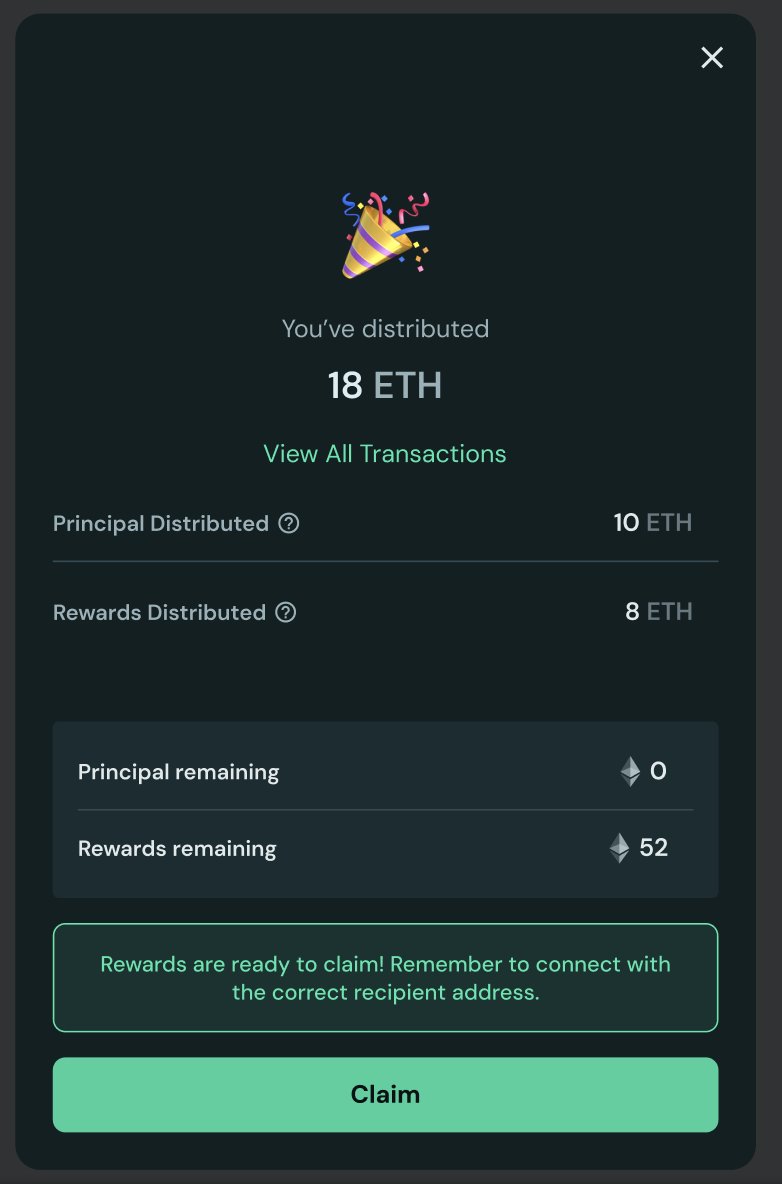
After the distribute transaction is successfully sent, the success page shows a summary of the amount distributed and the new principal + rewards. If rewards were distributed, they will be ready to claim on the dashboard page.
Understanding Distribution in Detail
-
The distribution starts by looking at the total distributable amount (
DA) that is comprised of OVM's balance (OB) and Splitter's balance (SB). -
Upon sending the distribute transaction:
OBbalance is checked against principal threshold (PT) and current principal (CP), both of which are tracked in the OVM contract.- If
OB>PTandCP>OB: All ofOBis transferred to principal recipient and tracked principal is debited byOB, in other words, the new principal in OVM isCP-OB - If
OB>PTandCP<OB: Since there is not sufficient principal for distributing all ofOB, onlyCPwill be distributed as principal and will be sent to the principal recipient. The remainder ofOB-CPwill be sent to the reward recipient as rewards. The reward recipient could be a splitter contract, therefore a new splitter contract balance can beSBnew=SB+OB-CP. Current Principal will be set to 0 as no principal is remaining. - If
OB<PT: All ofOBwill be sent to reward recipient as rewards. This reward recipient could be a splitter contract so the new splitter contract balance can beSBnew=SB+OB
- If
- If the reward recipient is a splitter,
SBnewbalance (Previous splitter balance + new ETH from the OVM if it was rewards) will be distributed and all of the addresses in splitter config can now claim their reward on the dashboard.
Distribution Flow Summary
| Condition | OVM Balance (OB) vs Principal Threshold (PT) | Current Principal (CP) vs OB | Distribution Result |
|---|---|---|---|
| Case 1 | OB > PT | CP > OB | All OB → Principal RecipientNew Principal = CP - OB |
| Case 2 | OB > PT | CP < OB | CP → Principal RecipientOB - CP → Reward RecipientNew Principal = 0 |
| Case 3 | OB < PT | N/A | All OB → Reward Recipient |
💡 Remember: If the reward recipient is a splitter contract, the distributed rewards will be available to claim on the Operator Dashboard, not sent directly to individual addresses in the splitter configuration.