Claim Rewards
For every epoch, active validators earn ETH rewards from both the consensus layer and the execution layer. The consensus layer rewards are derived from validator duties such as attestation, proposals, and sync committees. These rewards are accumulated in the validator's withdrawal address. Execution rewards, which are earned from MEV and transaction priority tips, are accumulated in the fee recipient address.
New Claim Rewards Process (0x02 Validators)
Whether your cluster is created with OVMs as withdrawal address or EOA as withdrawal address, the process is similar. There are three steps:
1. Withdraw Rewards / Principal
WWith the introduction of compounding, 0x02 validators no longer support automatic withdrawal sweeps to compound rewards. As a result, rewards are not sent directly to the withdrawal address. Instead, the withdrawal address must send a withdrawal request.
- Refer to the following documentation to withdraw rewards:
- If the withdrawal address is an EOA: See the Request Withdrawal guide for EOA-specific instructions.
- If the withdrawal address is an OVM: See the Request Withdrawal guide for OVM-specific instructions.
Be very careful about the amount of ETH you withdraw, as it will govern whether the amount will be treated as principal or rewards. Read more about this in the withdrawal request FAQ.
- If there are already undistributed rewards, make sure to distribute them before the withdrawal is processed (unless you want to send them to the principal recipient). BThis is because, after the withdrawal is processed, the new withdrawal amount and any previously undistributed rewards may combine and cross the principal threshold.
💡 In case of 0x01 validators, no withdrawal is required. Withdrawal skimming happens on a regular basis and will be sent to OVM balance. If you are using legacy Obol splits contracts with 0x01 validators, also called OWRs, then you can jump to the distribute stage (see Legacy OWR Flow below).
2. Distribute the Rewards
If you are using OVM, distribute the ETH that has been withdrawn from the validators. Upon distribution, it will be sent to either the principal recipient or will be sent as rewards and ready to be claimed on the operator page.
💡 The amount of ETH withdrawn in the previous step will be sent to OVM. If the OVM balance is greater than the principal threshold, upon distribution the ETH from OVM balance will be sent to the principal address. If the OVM balance is below the principal threshold, it will be sent to the fee recipient splitter. If rewards are sent to the fee recipient splitter, they will be distributed again according to split configuration. But all of these multiple distributions are batched together under a single distribute action.
💡 For legacy 0x01 validators with OWR withdrawal addresses, distribute works just like before. Click the distribute icon to trigger the distribution.
3. Claim
Once the funds are distributed, go to the Operator Dashboard to claim the rewards.
Legacy OWR Flow (Deprecated)
This section documents the legacy OWR (Optimistic Withdrawal Recipient) flow for older 0x01 validators. For new clusters with 0x02 validators, please use the New Claim Rewards Process above.
The method for claiming rewards depends on the cluster's withdrawal configuration, whether it's an OWR or an Exitable Withdrawal Configuration. The table below outlines the latest details on how and where to claim rewards.
Claim Status
| Withdrawal Configuration | Subcategory Description | Is supported on Launchpad? | Where to claim? |
|---|---|---|---|
| 1. Claim principal + rewards without splits - Exit and get rewards | To claim principal or rewards without splits, users currently have to exit the validator. | ✅ | Cluster details page in the Operator Dashboard. For example, here. |
| 2. Splits only rewards using OWR - ETH | For all clusters with ETH rewards. Requires two steps: (1) Distribute on cluster details page, (2) Claim on operator page. | ✅ | Step 1: Cluster details page - Click Distribute button for each OWR. Step 2: Operator page - Claim your share. For example, here. |
| 3. Split principal + rewards - ETH | For clusters configured to split both principal and rewards. | ✅ | Operators currently need to use the UI provided by Splits.org. For example, a Lido Split. |
| 4. Splits non-ETH rewards using any withdrawal config - wstETH | For Lido clusters earning rewards in protocol-specific tokens. | In Progress ➡️ | Operators currently need to use the UI provided by Splits.org. For example, a Lido Split. |
| 5. Lido CSM rewards - wstETH | For all Lido CSM clusters earning wstETH rewards. | In Progress ➡️ | Similar to row number 3, use the Splits UI. More details can be found at the bottom of this page. |
Claim Flow
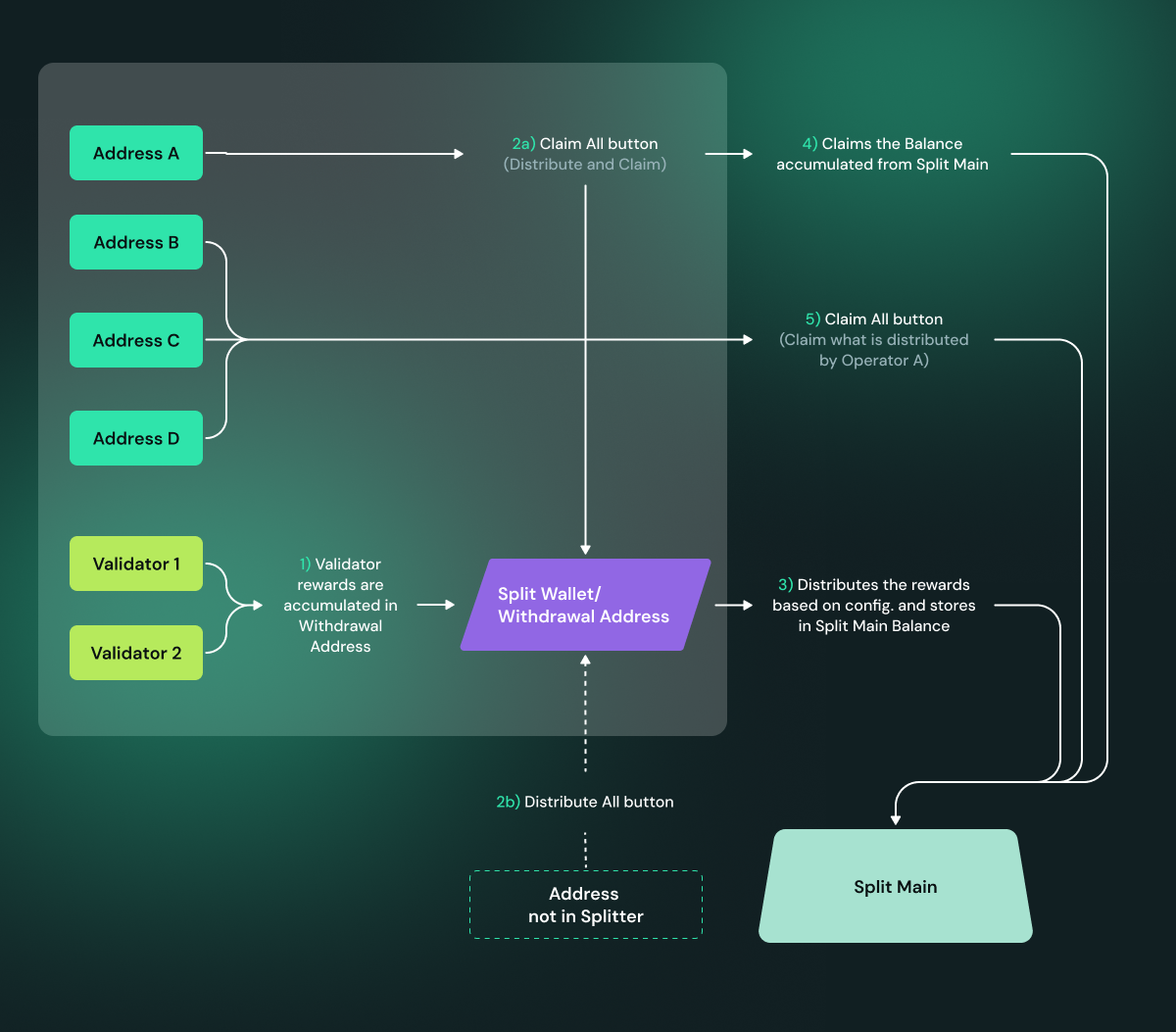
To understand how claims via Launchpad work, it is highly recommended to first understand how splits work. More details are available here. The flowchart below summarizes how an operator and a non-operator can interact with split contracts to facilitate claims:
Updated OWR Process:
- All validator rewards are accumulated in the validator's withdrawal address, which is an OWR (Optimistic Withdrawal Recipient) contract.
- Distribute on Cluster Details Page: On the cluster details page, you will see a Distribute button for each OWR. Click the Distribute button to send rewards from the OWR to the Split Main contract. This step must be completed before claiming.
- Claim on Operator Page: After distribution is complete, navigate to the operator page to claim your share of the rewards. The rewards will be distributed according to the split configuration set at cluster creation.
- The Split Main contract sends proportional rewards to each operator based on their configured split percentage.
Note: There is no longer a "Claim All" button on the cluster details page. The process now requires two steps: first distribute in the cluster details page, then claim at the operator page.
Launchpad Edge Cases
We are constantly improving the user experience. Below are some edge cases to avoid confusion:
Case 1: You need to distribute before claiming
Make sure you have clicked the Distribute button for each OWR in the cluster details page before attempting to claim rewards at the operator page. If you try to claim before distributing, there may be no rewards available to claim.
Case 2: Multiple OWRs in a cluster
If your cluster has multiple OWRs (one per validator), you will see a separate Distribute button for each OWR. You need to distribute from each OWR individually before claiming your rewards. After all distributions are complete, you can claim your total share from the operator page.
Case 3: You just created a new cluster with no active validators or rewards, but it shows claimable amounts
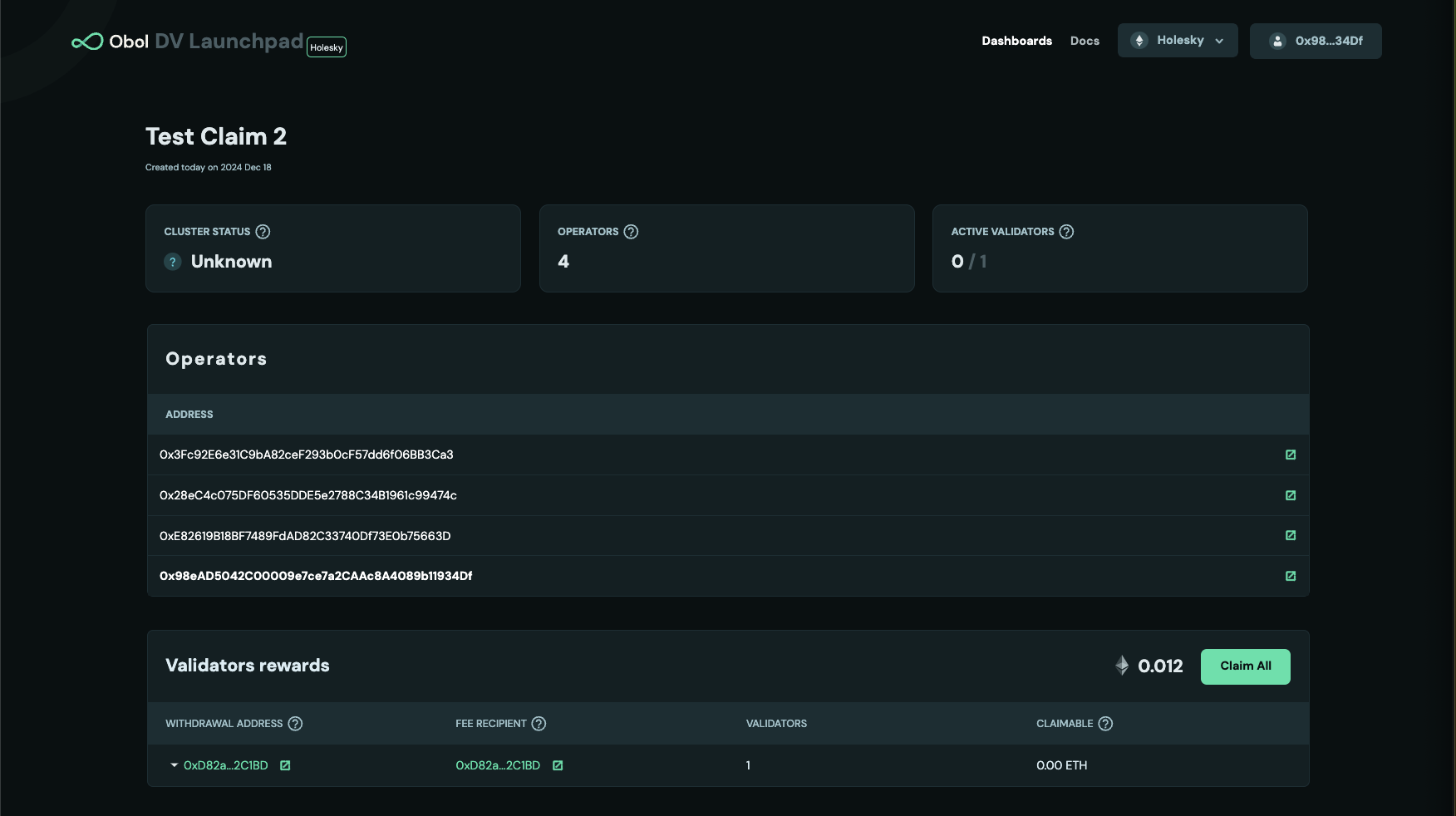
The amount shown here is from a previous case and is now sitting in the Split Main, ready to be claimed. Unfortunately, it is not possible to associate the Split Main balance of an address with a specific cluster. If you are part of multiple clusters, your Split Main balance will appear next to all claim buttons, regardless of the cluster. We are working on a fix to avoid this confusion.